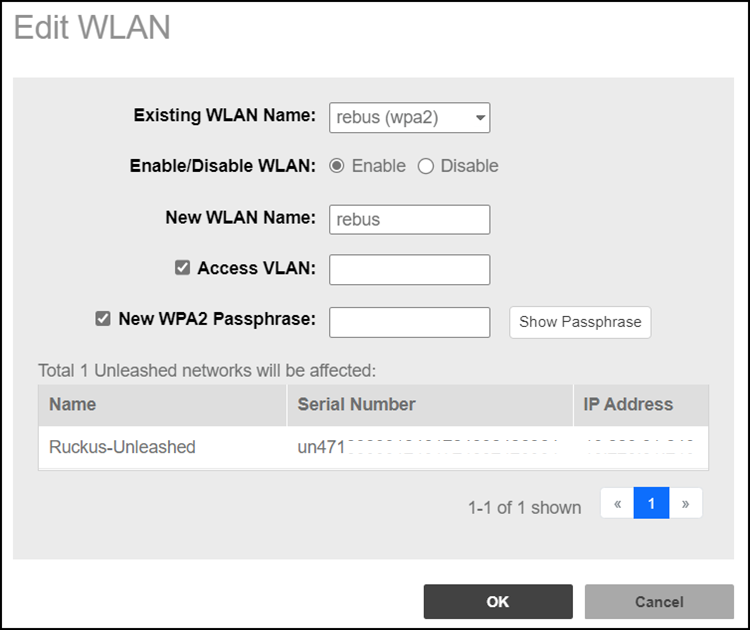
Editing a WLAN
You can configure the WPA2passphrase
of the WLAN associated with an Unleashed network to synchronize configuration between
network networks.
Note: You can apply the new passphrase to
all WLANs, but the new passphrase will only take effect when the WLAN's Encryption
Method is WPA2.
- After you log in to the Remote
Management Services web interface, select Networks from the main menu. The Networks page appears, listing all the networks managed by Remote Management Services for Unleashed.
- From the list of networks, select the Unleashed network for which you want to edit the WLAN SSID, then click Edit WLAN.
- In the Existing WLAN Name field, select the ESSID from the drop-down list. The name, IP address, and serial number of the Unleashed network is displayed.
- In Enable/Disable WLAN, select the desired radio button.
- In New WLAN Name, you can enter a name for the WLAN .
- Click the Access VLAN checkbox to edit the access VLAN.
- Click the New WPA2 Passphrase checkbox to provide the password of the WLAN.
- Click OK. The changes for the network are saved and refreshed in the table.