Allocating and Recycling Licenses to Network Groups
Allocate refers to the transfer of licenses among Brand or Domain or Group administrators.
The following steps explain how Domain Admins can allocate licenses to any network group.- After you log in to the Remote Management Services Domain Admin web interface, select Licenses from the Administration menu.
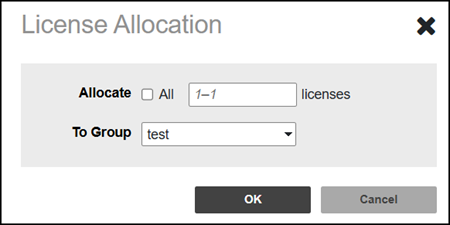
- To allocate the licenses to a network group, click Allocate. The License Allocation page is displayed. You can either allocate all the licenses to a specific network group or allocate a specific number of licenses.
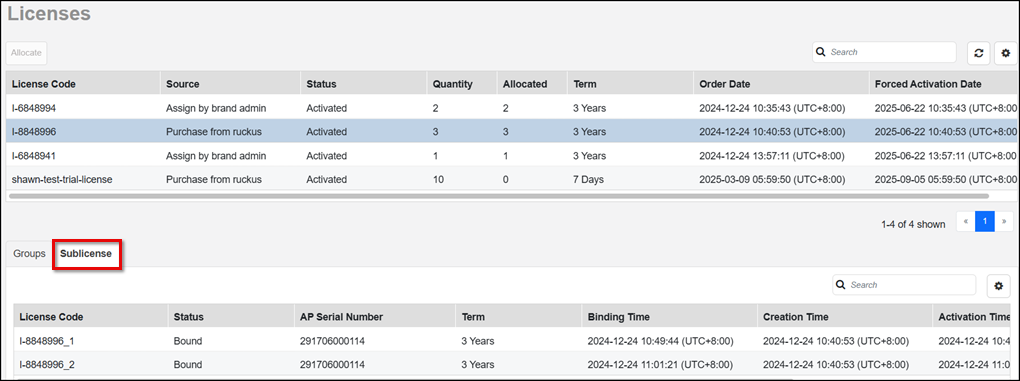
- Click OK. A success message appears, and the license allocated to the network group can be seen under the Groups tab. It also displays the group name, the license quantity, the number of allocated licenses, and the number of used licenses. The Sublicense tab displays how the allocated licenses are being utilized. It displays the license code, including the license status, assigned AP serial number, term, binding time, creation time, activation time, and expiration date.
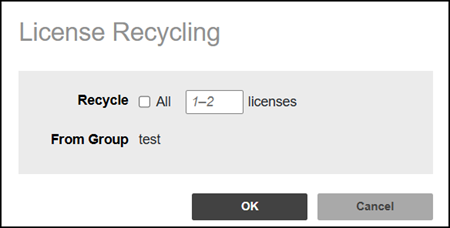
- Select a Group and click Recycle to recycle the unused licenses. The License Recycling page is displayed. If the allocated licenses are not in use, we can recycle them to another group. You can choose to recycle all licenses to a specific group or a certain number of licenses.