Licenses
Both Brand Administrators and Domain
Administrators have the ability to view and acquire licenses from the RUCKUS.
The Brand Admin has the discretion to determine whether Domain Administrators are authorized to make independent purchases of licenses from RUCKUS. Otherwise, the Brand Admin can allocate licenses to a specific Domain. Refer to License Purchase for more information.
Click the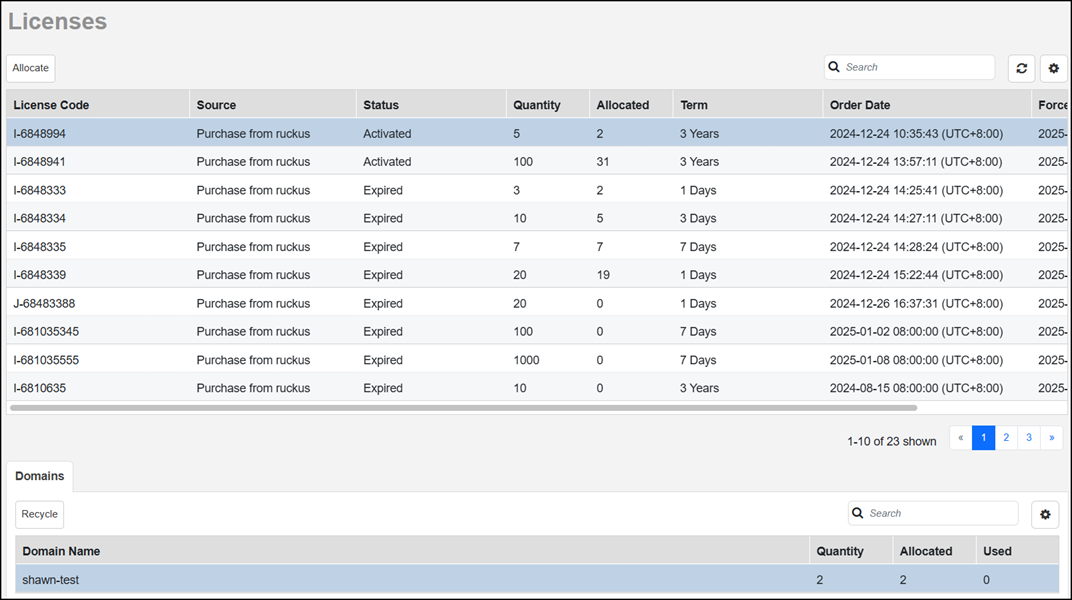
 icon (available above each table on the Licenses page) to select
and deselect the contents of the table, select the number of rows to show, and manage
the Search function criteria. The following table lists some of the fields and table
columns that appear by default in the Licenses table.
icon (available above each table on the Licenses page) to select
and deselect the contents of the table, select the number of rows to show, and manage
the Search function criteria. The following table lists some of the fields and table
columns that appear by default in the Licenses table. Licenses Properties
| Field/Column | Description |
|---|---|
| License Code | The order item code in your license file. |
| Source | Indicates whether the license is purchased from RUCKUS or assigned by the Brand Administrator. |
| Status | Displays the status of the license. |
| Quantity | Indicates the number of licenses available. Each license corresponds to one AP or network. |
| Allocated | Displays the quantity of licenses allocated to other networks. |
| Term | Displays the license term. |
| Order Date | Displays the license order date. |
| Forced Activation Date | Displays the date that occurs 180 days after the order date. If the license has not been manually activated by this date, then it will be automatically activated. |