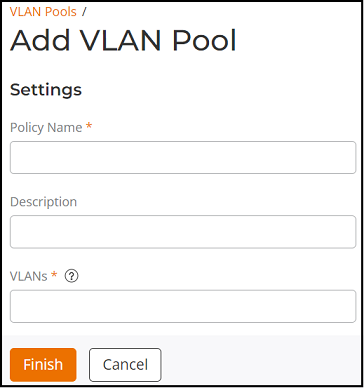
Creating a VLAN Pool
You can add a VLAN Pool profile at
multiple venues.
To use the VLAN Pooling feature, you must create a VLAN Pooling profile and assign the profile to a specific WLAN.
Complete the following steps to create a VLAN Pool policy:
- From the navigation bar, select
. Alternatively, You can click on . The Service Catalog page is displayed.
- Find the VLAN Pools tile and click Add.
- Complete the following
fields:
- Policy Name: Enter a unique name for the VLAN Pool policy.
- Description: Enter a description for the VLAN Pool policy.
- VLANs:
Enter the VLANs to be added to the VLAN Pool.
You can enter one or multiple VLANs. The valid range is from 2 through 4096. You can add up to 64 VLAN members to a VLAN Pool.
Only VLAN IDs. AP model: 11ac wave 2 supports a maximum of 64 VLANs. Other AP models support up to 32 VLANs.??
- Click Finish. A VLAN Pool policy is created and is displayed in the VLAN Pools page.