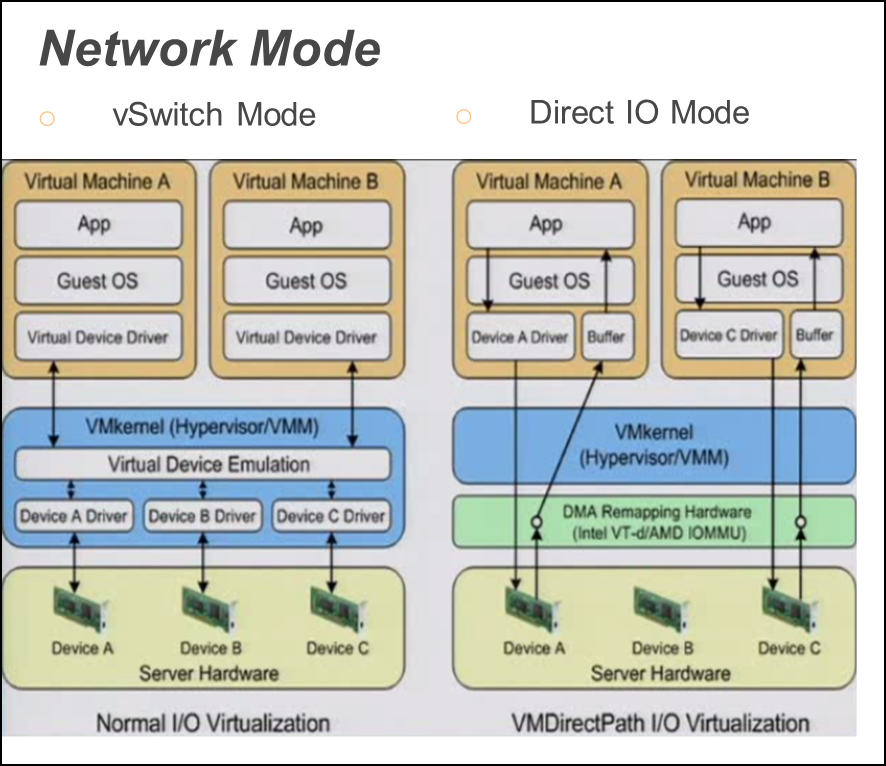
vSZ-D supports two modes of operation: direct IO mode and vSwitch mode.
For best performance, RUCKUS recommends using the
direct IO mode. SR-IOV mode is unsupported. Refer to the table below for mode of
operation
Note: NICs assigned to direct IO cannot be shared. Moreover, VMware features such as vMotion,
DRS, and HA are unsupported.
The hardware configuration for a single vSZ-D
instance specified in the guide will scale to handle 10K tunnels (10K APs) and
up to
10Gbps of throughput (unencrypted) with appropriate underlying Intel NIC cards
(10G
interfaces) in directIO mode of operation. This aligns with the number of RUCKUS
AP that
a vSZ controller supports. Refer to the dimensioning table below.
Hardware Dimensioning
Number of vSZ Instances
Number of vSZ-D Instances
Number of RUCKUS APs
Number of Tunnels on vSZ-D
Maximum Throughput (Unencrypted)
Notes
1
1
10000
10000
10 Gbps
It is recommended to have 10G NICS on the vSZ-D
considering the high number of RUCKUS APs.
1
2
10000
5000 (10K maximum in case of failover)
10 Gbps
Tunnels are
load-balanced towards the vSZ-D by the vSZ. This is useful when
data plane redundancy is required. It is recommended to have 10G
NICS on the vSZ-D considering the high number of RUCKUS APs.
2
2
10000
5000 (10K maximum)
10 Gbps
Tunnels are load-balanced towards the vSZ-D by the
vSZ. Each vSZ-Dmim tunnels.
2
4
10000
2500 (10K maximum)
10 Gbps
Tunnels are load-balanced towards the vSZ-D by the
vSZ. Each vSZ-D instance can handle 10K maximim tunnels.
3
6
20000
3300 (10K maximum)
10 Gbps
Tunnels are load-balanced towards the vSZ-D by the
vSZ. Each vSZ-D instance can handle 10K maximim tunnels.
4
8
30000
3750 (10K maximum)
10 Gbps
Tunnels are load-balanced towards the vSZ-D by the
vSZ. Each vSZ-D instance can handle 10K maximim tunnels.
Note: * vSZ-D needs to increase the CPUs to 6 for sustaining the 10GB line rate in random-byte
traffic when the encryption is enabled. Encrypted requires 6 cores and unencrypted
requires 3 cores
Modes of Operation
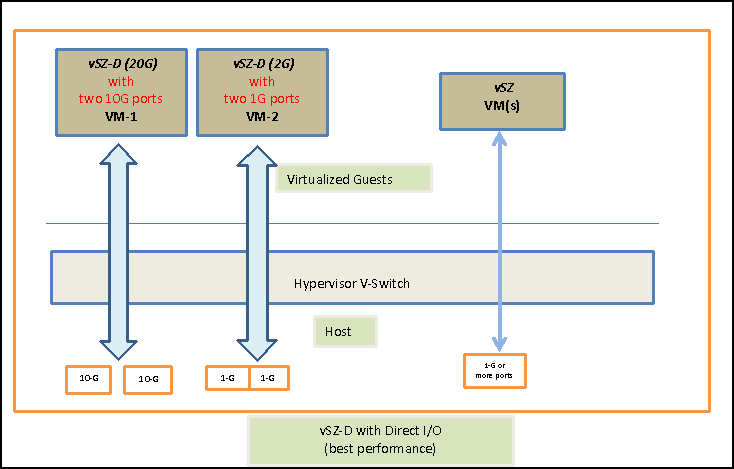
The figure below depicts a sample configuration in DirectIO mode. This is the recommended
deployment model for the vSZ-D for best performance benefits. In this setup, cores
as well as the NICs are dedicated to the vSZ-D VM only for best performance.
Note: In this setup, the vSZ-D data plane interfaces directly with the DPDK NIC, completely
bypassing the vSwitch
vSZ-D with Direct I/O
Note: The figure below depicts multiple virtual data plane instances for reference purposes
only.
It also depicts a vSZ controller instance running as a separate VM. These VMs can
be running on the same underlying host or potentially different hosts.
vSZ-D with Direct I/O
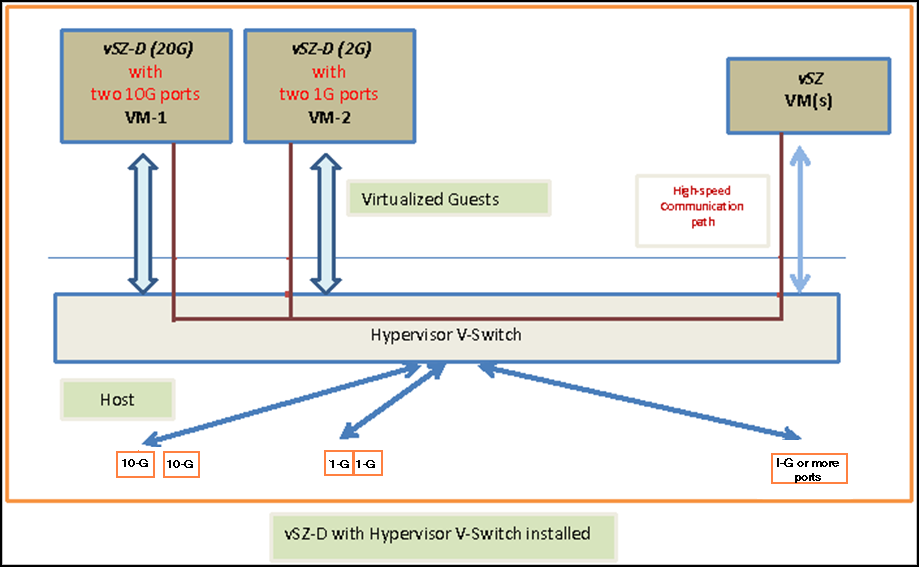
vSZ-D with Hypervisor vSwitch Installed
The figure below depicts a sample setup via the vSwitch.
Note: The figure below depicts multiple virtual data plane instances for reference. It also
depicts a vSZ controller instance running as a separate VM.
vSZ with Hypervisor vSwitch
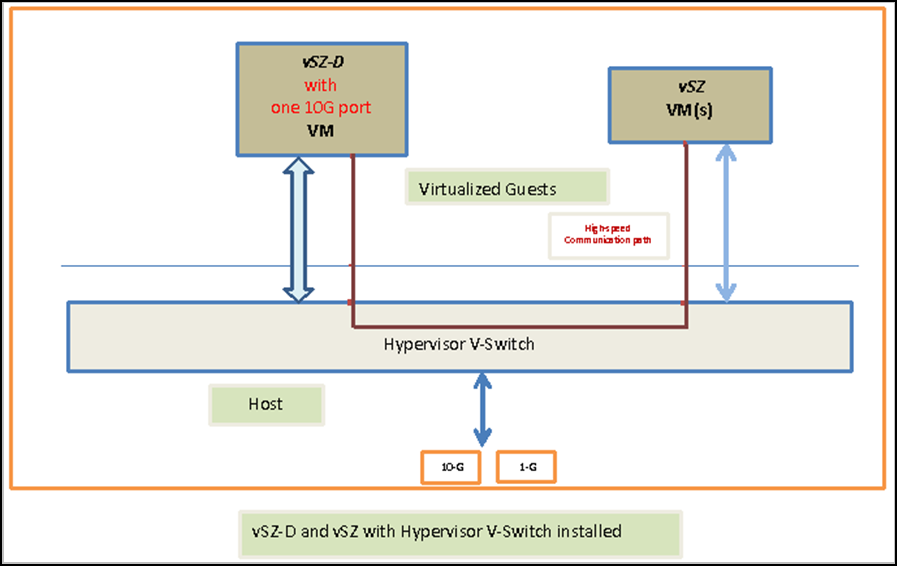
vSZ-D and vSZ with Hypervisor vSwitch Installed
The figure below depicts an architecture where vSZ and vSZ-D are running on the same
underlying host.