NAT Deployment Topologies
AP Behind NAT and vSZ-D/SZ100-D/SZ144-D Behind NAT
When an AP is behind NAT, it is assumed that AP is sitting in the private world and wants to talk to vSZ-D/SZ100-D/SZ144-D in the public world through NAT. The AP obtains its private IP address and communicate with the vSZ-D/SZ100-D/SZ144-D through NAT. During communication with vSZ-D/SZ100-D/SZ144-D, the NAT router will intercept the packet and change the source IP address (which is the AP IP address) to a public IP address and add a new source port number before forwarding the packet to vSZ-D/SZ100-D/SZ144-D. vSZ-D/SZ100-D/SZ144-D, in this case, is insensitive to the NAT router’s operation. When the packet comes back from vSZ-D/SZ100-D/SZ144-D to the AP, the NAT router will intercept the packet and translate the destination IP address and port number back to the appropriate (original) AP IP address and port number.
When vSZ-D/SZ100-D/SZ144-D is behind NAT, it is assumed that vSZ-D/SZ100-D/SZ144-D is sitting in the private world and wants to talk to the AP in the public world through NAT. In this case, it is needed to setup the NAT IP (public IP) and a port number pair in vSZ-D/SZ100-D/SZ144-D “setup” process. vSZ picks up this public address and the associated port number and informs the AP that this is the vSZ-D/SZ100-D/SZ144-D address/port (public-IP, port) pair to connect to.
It is also needed to configure the NAT device and enter the port mapping, basically, (public-IP, port) <-> (private-IP, 23233) into NAT’s rule table. Thus, when NAT receives the packet bound for vSZ-D/SZ100-D/SZ144-D (sent to public-IP/port) from the AP, it will translate it to (private-IP, 23233) based on the rule table before sending it to vSZ-D/SZ100-D/SZ144-D, and conversely, for packet from vSZ-D/SZ100-D/SZ144-D, NAT router will look at the srcIP/srcPort (IP, 23233), and convert it to public IP address or port based on the rule table before sending it to AP.
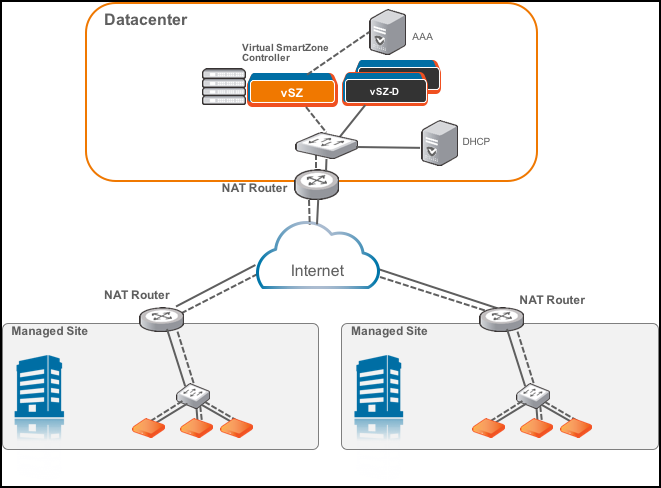
vSZ and vSZ-D/SZ100-D/SZ144-D at Data Center Behind NAT
In this deployment topology, vSZ-D/SZ100-D/SZ144-D and vSZ are co-located at the data center behind NAT, while Ruckus APs are on the access network behind NAT.
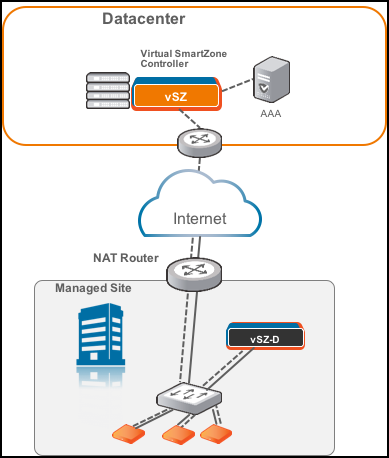
vSZ-D/SZ100-D/SZ144-D at Access Site with NAT
In this deployment topology, vSZ is at the data center and vSZ-D/SZ100-D/SZ144-D is co-located with the Ruckus APs on the access network. In this scenario, there are NAT routers between vSZ and vSZ-D/SZ100-D/SZ144-D/Ruckus APs.
vSZ-D/SZ100-D/SZ144-D Behind NAT
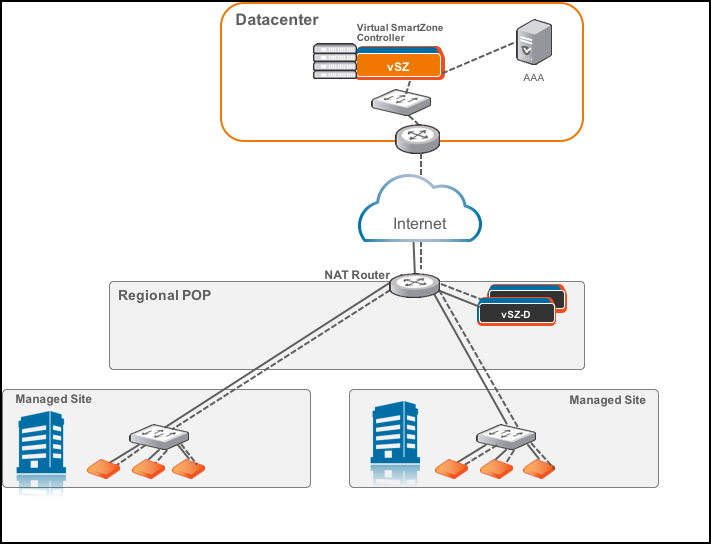
In this deployment topology, vSZ is at the data center and vSZ-D/SZ100-D/SZ144-D is in a distributed site but not co-located with the Ruckus APs within the access network. There are NAT routers between vSZ and vSZ-D/SZ100-D/SZ144-D, and between vSZ-D/SZ100-D/SZ144-D and Ruckus APs. The vSZ-D/SZ100-D/SZ144-D port to communicate with vSZ control plane is port 22.
DHCP Relay with NAT
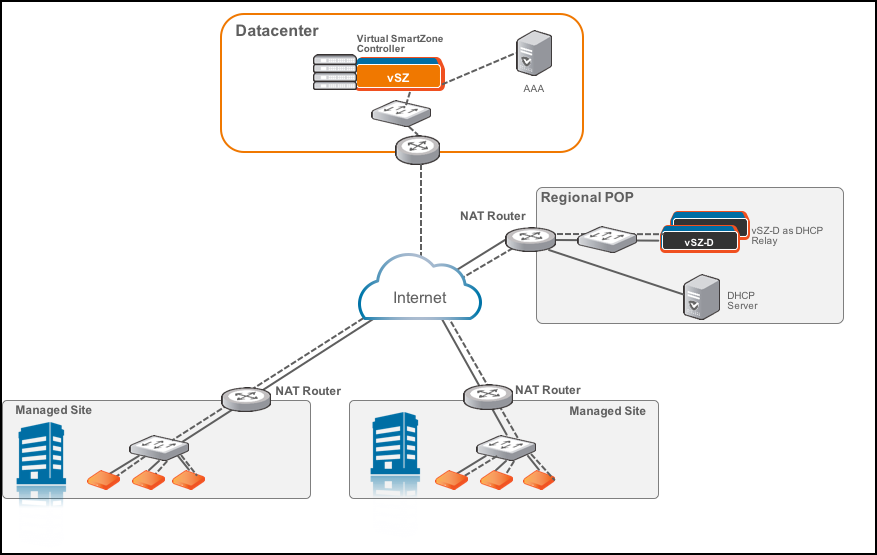
Similar to the vSZ-D/SZ100-D/SZ144-D Behind NAT, in this deployment topology, vSZ is at the data center and vSZ-D/SZ100-D/SZ144-D is in a distributed site but not co-located with the Ruckus APs within the access network. There are NAT routers between vSZ and vSZ-D/SZ100-D/SZ144-D, and between vSZ-D/SZ100-D/SZ144-D and Ruckus APs. However, in this topology, the DHCP server assigning client IP addresses is on its own separate subnet. vSZ-D/SZ100-D/SZ144-D provides the DHCP relay function to support such a network configuration.
DHCP Option 82 and Bridge Profile
If you are enabling the DHCP Option 82 in WLAN
configuration in the controller vSZ, it means that the AP is going to put DHCP
Option 82 in the DHCP server and will send it to vSZ-D/SZ100-D/SZ144-D. This is
in
the format IF-Name:VLAN-ID:ESSID:AP-Model:AP-Name:AP-MAC. If you want to give
the users the option to choose what needs to be included in DHCP Option 82, you
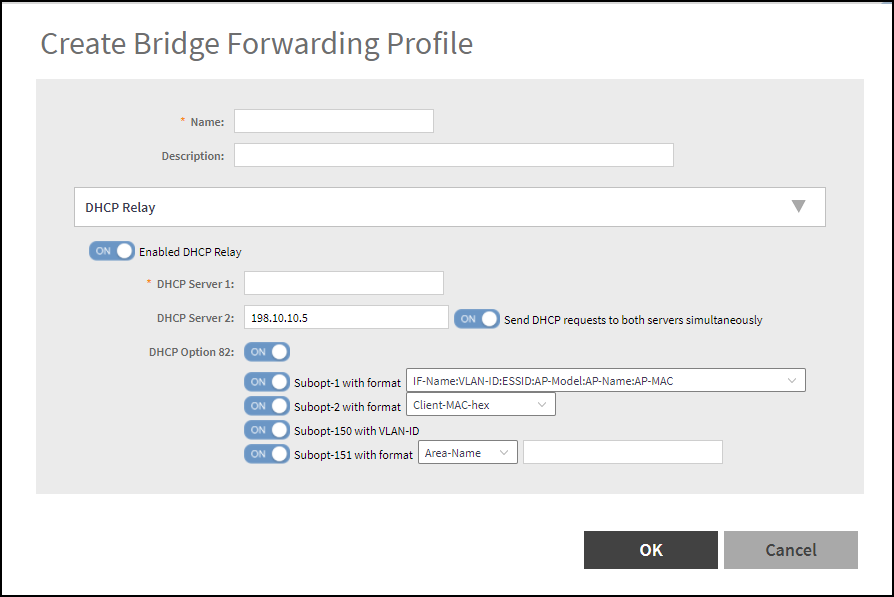
would need to create a Bridge
Service Profile in the vSZ controller web interface. Follow the steps to
create a Bridge Service
Profile.
- Go to .
- Click on Create.
- Enter the bridge forwarding
profile information
- In the Name field, type a name for the bridge forwarding profile.
- In the Description field, type a short description for the profile.
- Ensure the Enabled DHCP Relay option is selected.
- Enter the DHCP server IP addresses. Select the Send DHCP requests to both servers simultaneously option, if you want to send the request to both the servers.
- Enable DHCP Option 82 and choose the sub options based on your requirement or of the user. This will be taken care by vSZ-D/SZ100-D/SZ144-D during DHCP packet relay to the DHCP server.
- Go to .
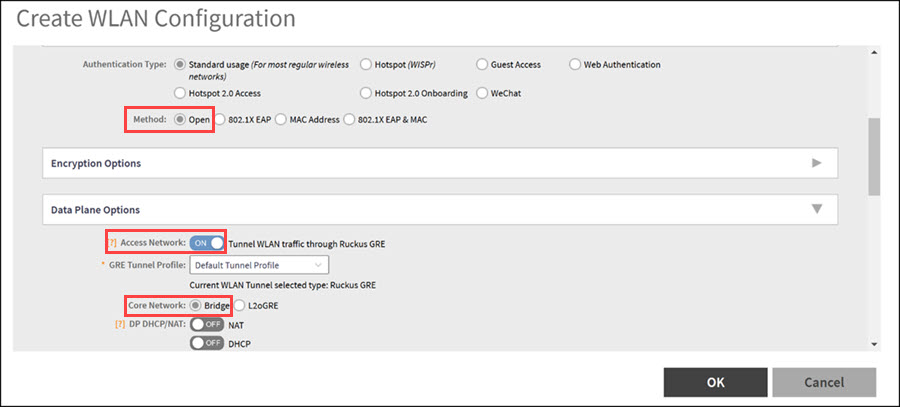
- Click Create to add a new WLAN configuration:
- In the Authentication Options section, select Method as Open.
- In the Encryption Options section, select Method as None.
- In the Data Plane Options section:
- Select Forwarding Policy as Factory Default or Bridge profile.
- Click OK to save the configuration.