Communication Workflow
The following are the steps seen in the above figure.
- Update the vSZ controller to the latest
release or perform a fresh install of the vSZ controller with the latest release
Note: If you are upgrading the vSZ controller and the vSZ-D/SZ100-D/SZ144-D, RUCKUS recommends the update of vSZ controller before the update of vSZ-D/SZ100-D/SZ144-D
- Install vSZ-D/SZ100-D/SZ144-D and point it to the vSZ-E or vSZ-H controller by using the following options:
- The vSZ-D/SZ100-D/SZ144-D management interface connects with the vSZ-E or vSZ-H controller control interface
- The vSZ-E or vSZ-H controller administrator approves the vSZ-D/SZ100-D/SZ144-D connection request
- The vSZ informs the AP of the vSZ-D/SZ100-D/SZ144-D data interface
- The vSZ-D/SZ100-D/SZ144-D is displayed as active and managed on vSZ-E or vSZ-H
- AP establishes a RUCKUS GRE tunnel with the vSZ-D/SZ100-D/SZ144-D data interface when a tunnelling WLAN is configured
Communication workflow between RUCKUS APs,
vSZ, and vSZ-D/SZ100-D/SZ144-D 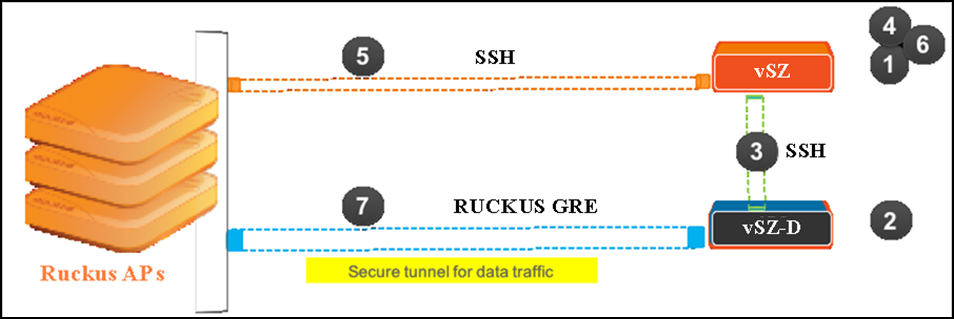 depicts logical network architecture. In real-world
deployments, there may be network routers, gateways, firewalls and other devices;
these
typical network devices are not shown in the figure to focus on the
vSZ-D/SZ100-D/SZ144-D interfaces and communication protocol aspects between the
various
entities.
depicts logical network architecture. In real-world
deployments, there may be network routers, gateways, firewalls and other devices;
these
typical network devices are not shown in the figure to focus on the
vSZ-D/SZ100-D/SZ144-D interfaces and communication protocol aspects between the
various
entities.
It is also important to note that support for distributed or centralized deployment topologies introduce NAT routers/gateway devices. The communication interfaces between RUCKUS APs, vSZ and vSZ-D/SZ100-D/SZ144-D are designed to support NAT traversal so as to support such deployment topologies.