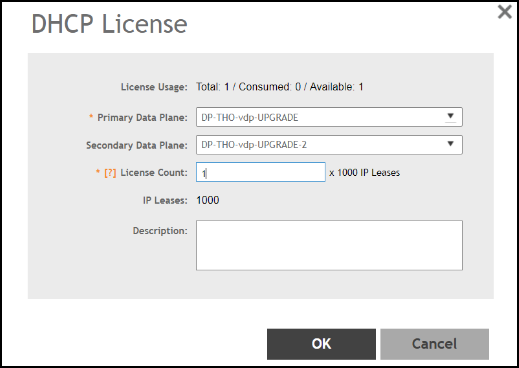
Creating DHCP License Assignment
Licensing needs to be created on a per SZ Controller Cluster basis. The default license,
CAPACITY-DP-SVDS-DEFAULT, supports 1K DHCP address leases.
- Go to .
- Select the DP DHCP/NAT Licenses Assignment tab.
- From the
DHCP License area, click
Create.
- License Usage: Lists the details of license consumption and availability.
- Primary Data Plane: Select the primary data plane from the drop-down. To remove the Data Plane from the DHCP license assignment, select Clear.
- Secondary Data Plane: Select the secondary data plane from the drop-down. To remove the Data Plane from the DHCP license assignment, select Clear.
- License Count: Enter the number of license. Range: 1 through 101.
- IP Leases: Lists the number of IPs assigned.
- Description: Enter a short description about the license assignment.
- Click OK.