Replacing a Fiber-Optic Transceiver
You can replace a fiber-optic SFP+ transceiver while the device is powered on and running.
While replacing a fiber-optic module, you must wear an ESD wrist strap with a plug that can be inserted in the ESD connector on the device.
Danger: For
safety reasons, the ESD wrist strap should contain a series 1 megohm resistor.
To replace a transceiver from an SFP+ slot, complete the following steps.
- Put on the ESD wrist strap and ground yourself by attaching the clip end to a metal surface (such as an equipment rack).
- Disconnect the cable connector from the port connector.
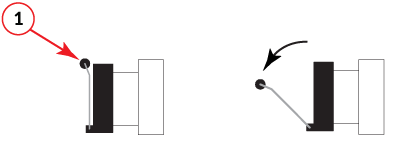
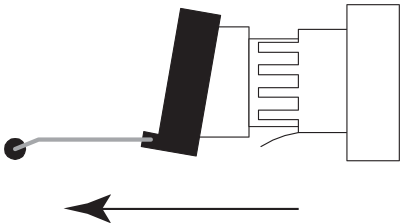
- Unlock the transceiver by pulling the bail latch forward, away from the front panel of the module. This unlocks the module from the front panel.
- Grasp the bail latch and pull the transceiver out of the port.
- Store the transceiver in a safe, static-free place or in an anti-static bag.
- If you are installing a new module or replacing a module, install the new module in the port.