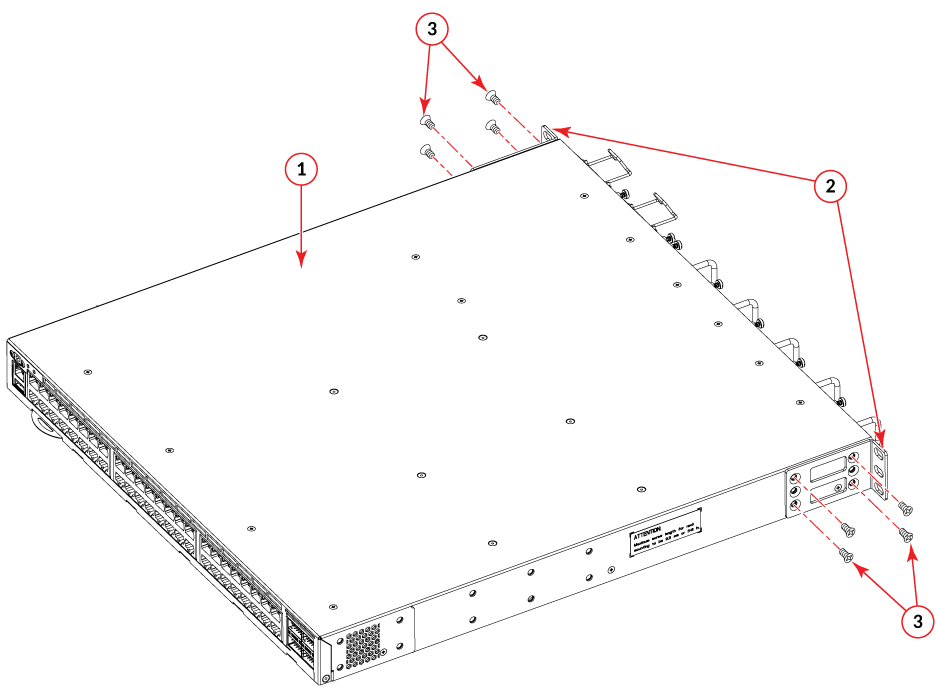
Front Brackets to the Rear of the Device
Note: In this installation, the brackets are named as listed in the parts list even though
the installation of the brackets is reversed from the flush-front installation.
Complete the following steps to attach the front brackets to the rear of the device.
- Position the right front bracket with the flat side against the right rear side of the device, as shown in Front Brackets to the Rear of the Device.
- Insert four 8-32 x 5/16-in. flathead screws through the vertically aligned holes in the bracket and then into the holes on the side of the device. Use the upper and lower screw holes, leaving the center holes empty.
- Repeat and to attach the left front bracket to the left rear side of the device.
- Tighten all the 8-32 x 5/16-in. screws to a torque of 15 in-lb (17 cm-kg).