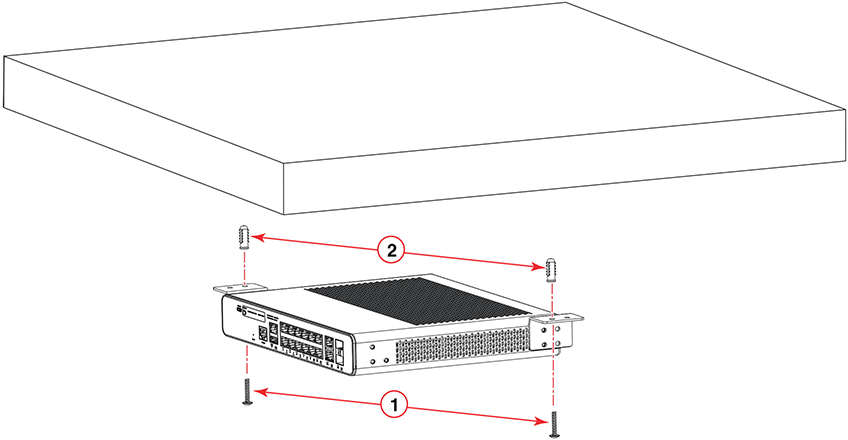
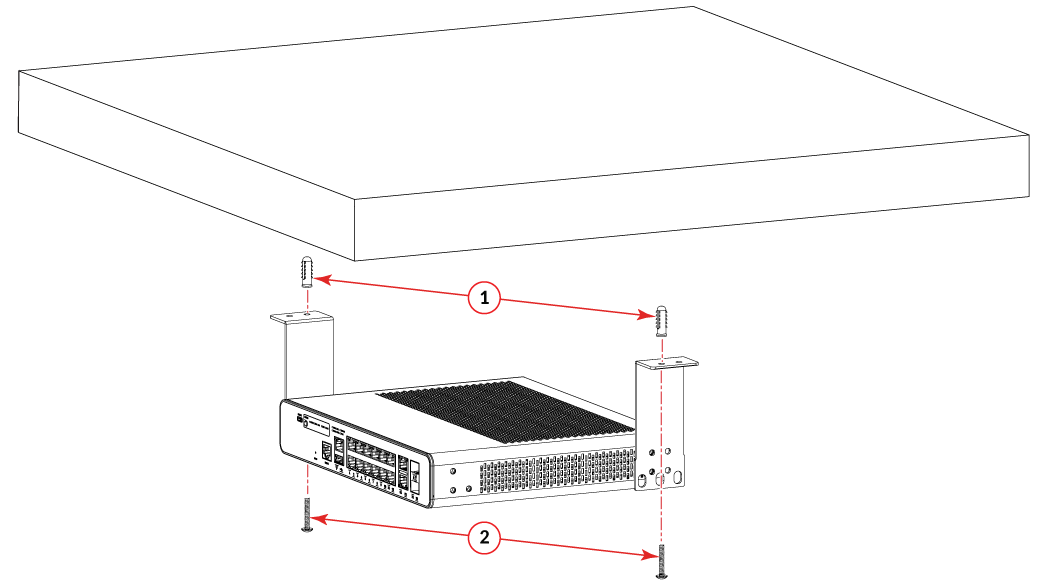
Mounting the Compact Device Under a Fixed Surface
Use the following items to mount the device under a fixed surface such as a desk or shelf.
- #2 Phillips screwdriver
- Hammer
- Drill
- Mounting anchors
- Wall/under desk mount kit (ICX7000-C12-WMK: short brackets) or two-post rack mount kit (ICX7000-C12-RMK: long or ICX 7150-C10ZP-RMK brackets)
- Mounting screws
Danger: When mounting the device under a fixed surface, under a desk, or under a shelf, mount
the device with the bottom panel down and in a place where there is not much foot
traffic. The fixed surface must be strong enough to withstand the weight of the device
such that the device or the surface does not fall down.
Caution: When mounting the device under a fixed surface, under a desk, or under a shelf, use
the long brackets to provide adequate ventilation and not exceed the operating temperature.
Caution: Do not install the device in an environment where the operating ambient temperature
might exceed 35°C (95°F).
Complete the following steps to mount the device under a fixed surface.
- Using a Phillips screwdriver, attach the mounting brackets to the diagonally opposite sides of the device using four M4L8 Pan-head screws on each side.
- Drill two holes under the fixed surface or desk where you want to mount the device.
- Hammer the mounting anchors into the two holes.
- With the bottom panel of the device facing down, use the #2 Phillips screwdriver to secure the two mounting screws into the mounting anchors.