Untagged Port Using VLAN 2 as Port Native VLAN
The following figure shows an example in which a Port Native VLAN is not VLAN 1. In this case, VLAN 1 uses tagged frames and VLAN 2 uses untagged frames.
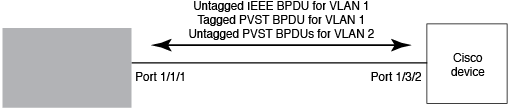
To implement this configuration, enter the following commands on your RUCKUS device.
device(config)# default-vlan-id 4000
device(config)# vlan 1
device(config-vlan-1)# tagged ethernet 1/1/1
device(config-vlan-1)# exit
device(config)# vlan 2
device(config-vlan-2)# untagged ethernet 1/1/1
device(config-vlan-2)# exit
device(config)# interface ethernet 1/1/1
device(config-if-1/1/1)# vlan 2
device(config-vlan-2)# untagged ethernet 1/1/1
device(config-if-1/1/1)# pvst-mode
device(config-if-1/1/1)# exit
These commands change the default VLAN ID, configure port 1/1/1 as a tagged member of VLAN 1 and as untagged member of VLAN 2, and enable PVST+ support on port 1/1/1. Since VLAN 1 is tagged in this configuration, the default VLAN ID must be changed from VLAN 1 to another VLAN ID. Changing the default VLAN ID from 1 to 2 allows the port to process tagged frames for VLAN 1 and to process untagged frames and untagged PVST BPDUs on VLAN 2.
Port 1/1/1 will process BPDUs as follows:
- Process IEEE 802.1Q BPDUs for VLAN 1.
- Process untagged PVST BPDUs for VLAN 2.
- Drop tagged PVST BPDUs for VLAN 1.
The following configuration is incorrect.
device(config)# default-vlan-id 1000
device(config)# vlan 1
device(config-vlan-1)# tagged ethernet 1/1/1 to 1/1/2
device(config-vlan-1)# exit
device(config)# interface ethernet 1/1/1
device(config-if-1/1/1)# pvst-mode
device(config-if-1/1/1)# exit
device(config)# interface ethernet 1/1/2
device(config-if-1/1/2)# pvst-mode
device(config-if-1/1/2)# exit
In the configuration above, all PVST BPDUs associated with VLAN 1 would be discarded. Since IEEE BPDUs associated with VLAN 1 are untagged, they are discarded because the ports in VLAN 1 are tagged. Effectively, the BPDUs are never processed by the Spanning Tree Protocol. STP assumes that there is no better bridge on the network and sets the ports to forwarding. This could cause a Layer 2 loop.