PVST+ Protect
The following figure illustrates how a Cisco device running MSTP puts the port in a blocking state.
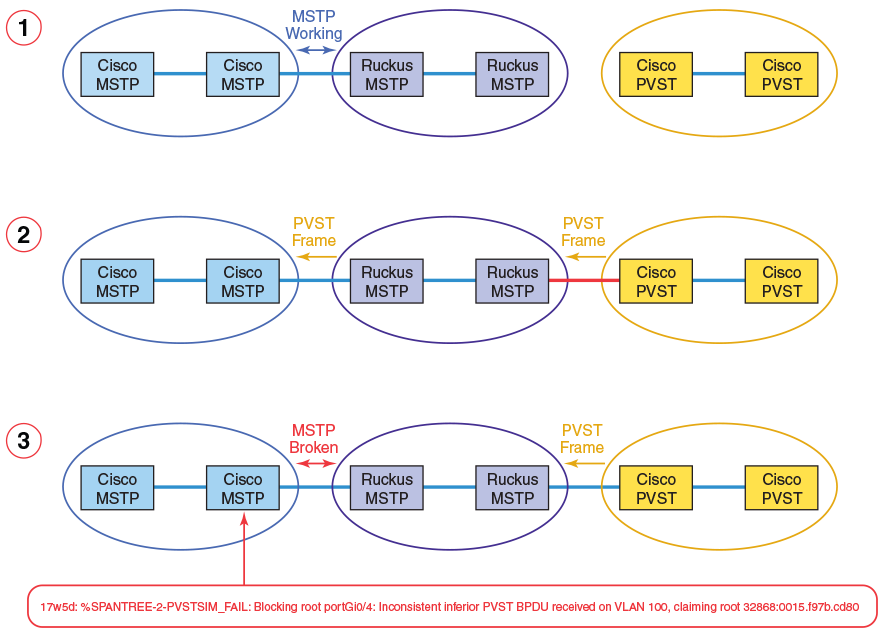
The processes are summarized as follows:
- RUCKUS and Cisco MSTP work correctly together, without any PVST devices in the topology.
- A PVST device is connected. RUCKUS MSTP devices flood PVST frames across topology.
- MSTP between RUCKUS and Cisco no longer works correctly, because Cisco assumes legacy PVST device is connected.
To configure PVST+ Protect, complete the following steps in any order:
- In global configuration mode, enter the
errdisable recovery causecommand and specify pvstplus-protect as the cause. If you do not enable automatic recovery, blocked ports will remain blocked. - Optionally, in global configuration mode, enter the
errdisable recovery
                     interval
command and specify a non-default recovery interval. (The default is 300 seconds.) - In interface configuration mode, enter the
pvstplus-protectcommand on an interface to be protected.
pvstplus-protect command cannot be issued concurrently with the
pvst-mode command. The following error message appears:
PVST mode not allowed on a PVST+ Protect mode
To change the recovery interval from the default, use the
errdisable recovery interval command.
device(config)# errdisable recovery interval 150
To confirm the error recovery status, use the
show errdisable recovery command.
device# show errdisable recovery
ErrDisable Reason                                               Timer Status
-----------------------------------------------------------------------------
all reason                                                      Disabled
bpduguard                                                       Disabled
loopDetection                                                   Disabled
invalid license                                                 Disabled
packet-inerror                                                  Disabled
loam-critical-event                                             Disabled
Reload the switch or stack to enable this port in 10G speed     Disabled
stack-port-resiliency                                           Disabled
broadcast traffic threshold exceeded                            Disabled
multicast traffic threshold exceeded                            Disabled
unknown unicast traffic threshold exceeded                      Disabled
pvstplus-protect                                                Enabled
Timeout Value: 60 seconds
Interface that will be enabled at the next timeout:
Interface         Errdisable reason   Time left (sec)
--------------    -----------------   ---------------
Port 1/1/1         pvstplus-protect         31
To enable PVST+ Protect on a single port, use the
pvstplus-protect command.
device(config)# interface ethernet 1/1/1
device(config-if-1/1/1)# pvstplus-protect
To confirm the running configuration on a specified Ethernet interface, use the
show running-config interface ethernet command.
device# show running-config interface ethernet 1/1/1
interface ethernet 1/1/1
 port-name ToCisco1
 pvstplus-protect
To display the status of PVST+ Protect on the
Ethernet interface, including the number of dropped PVST+ BPDUs:, use the show
pvstplus-protect-ports command.
device# show pvstplus-protect-ports ethernet 1/1/1
Port    PVST Drop Count
        1/1/1  2
To enable PVST+ Protect on a range of ports in interface configuration mode, use
the
pvstplus-protect command.
device(config)# interface ethernet 1/1/1 to 1/1/4
device(config-mif-1/1/1-1/1/4)# pvstplus-protect
To confirm the configuration on a specified Ethernet interface, use the
show interface ethernet command.
device# show interface ethernet 1/1/1
GigabitEthernet1/1/1 is ERR-DISABLED (pvstplus-protect), line protocol is down
  Port down for 3 second(s)
  Hardware is GigabitEthernet, address is cc4e.2407.affe (bia cc4e.2407.affe)
  Configured speed auto, actual unknown, configured duplex fdx, actual unknown
  Configured mdi mode AUTO, actual unknown
  Tagged member of 7 L2 VLANs, untagged in VLAN 1, port state is DISABLED
  BPDU guard is Disabled, ROOT protect is Disabled, Designated protect is Disabl
ed
  Link Error Dampening is Disabled
  STP configured to ON, priority is level0, mac-learning is enabled
  Flow Control is config enabled, oper disabled, negotiation disabled
  Mirror disabled, Monitor disabled
  Mac-notification is disabled
  Not member of any active trunks
  Not member of any configured trunks
  Port name is ToCisco1
  Inter-Packet Gap (IPG) is 96 bit times
  MTU 1500 bytes
  300 second input rate: 0 bits/sec, 0 packets/sec, 0.00% utilization
  300 second output rate: 0 bits/sec, 0 packets/sec, 0.00% utilization
  8027 packets input, 561171 bytes, 0 no buffer
  Received 0 broadcasts, 8022 multicasts, 5 unicasts
  0 input errors, 0 CRC, 0 frame, 0 ignored
  0 runts, 0 giants
  2487 packets output, 420635 bytes, 0 underruns
  Transmitted 0 broadcasts, 2487 multicasts, 0 unicasts
  0 output errors, 0 collisions
  Relay Agent Information option: Disabled
Egress queues:
Queue counters    Queued packets    Dropped Packets
    0                   0                   0
    1                   0                   0
    2                   0                   0
    3                   0                   0
    4                   0                   0
    5                   0                   0
    6                   0                   0
    7                   0                   0
To view the logging status, use the
show logging command.
device# show logging
Syslog logging: enabled ( 0 messages dropped, 0 flushes, 226 overruns)
    Buffer logging: level ACDMEINW, 50 messages logged
    level code: A=alert C=critical D=debugging M=emergency E=error
                I=informational N=notification W=warning
Static Log Buffer:
Dec 31 18:00:40:I:System: Stack unit 1 POE  PS 1, Internal Power supply  with 68
000 mwatts capacity is up
Dynamic Log Buffer (50 lines):
Jan  4 13:49:49:I:System: Interface ethernet 1/1/1, state down
Jan  4 13:49:49:I:MSTP: MST 0 Port 1/1/1 - DISCARDING
Jan  4 13:49:49:I:MSTP: MST 2 Port 1/1/1 - DISCARDING
Jan  4 13:49:49:I:MSTP: MST 1 Port 1/1/1 - DISCARDING
Jan  4 13:49:49:I:PVST: Received PVST+ BPDU on PVST+ Protect enabled Port 1/1/1
, Vlan 100. Error Disabling

<---output omitted--->
To clear the PVST+ Protect statistics for one or more specified Ethernet ports:
device# clear pvstplus-protect-statistics ethernet 1/1/1