Workflow of Personal Identity Network Service Creation

Creating a Personal Identity Network has a recommended sequence.

Preconditions before creating a Personal Identity Network:

  • Deploy a RUCKUS Edge cluster (Active/Standby) to the venue where clients will be segmented.
  • For wired PIN deployments, complete the required switch preconfiguration, including:
    • VLAN configuration
    • Routed interface (Layer 3 interface) configuration
    • Port membership configuration on the distribution and access switches
    • Required Edge subnet/interface configuration
  • Onboard and validate all required infrastructure devices (RUCKUS Edge cluster, switches, and access points as applicable).
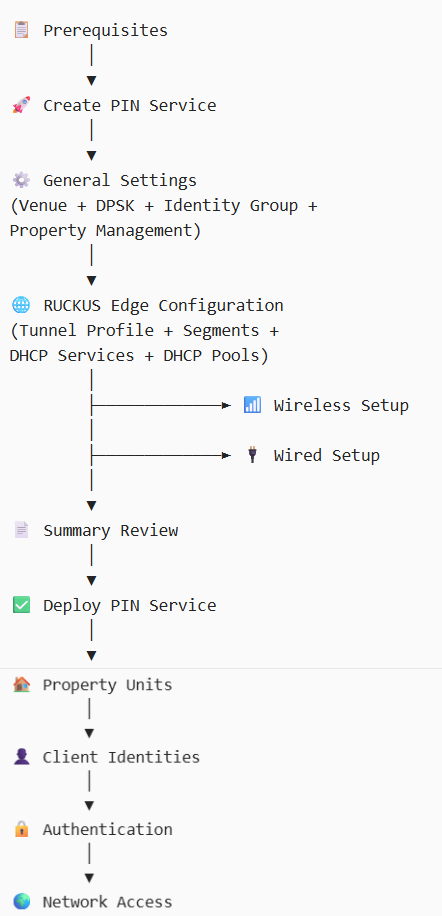
Workflow for Creating a Personal Identity Network Service

To ensure optimal network configuration, follow these steps for both wireless and wired access points:

  • Wireless Access Point (AP) - Enable the Personal Identity Network flag for networks. If you have no wireless APs in the venue, then enable the Personal Identity Network option in the DPSK network.
  • Wired Access Point (AP) - To enable wired AP:

    • Navigate to Venue/Property unit and select the unit.
    • Select AP from the drop-down list and assign a LAN port.