Troubleshooting IP Assignment Failures Due to DHCP Issues
IP assignment issues occur when an
endpoint fails to obtain an address from the DHCP server. Packet capture verifies
broadcast
DHCP exchange at the capture interface, allowing you to confirm whether DHCP discovery
and
response messages are present.
Note: DHCP traffic uses broadcast frames. The capture must be
performed on the LAN or access interface connected to the endpoint network.
- From the navigation bar, select
and click the
 icon to expand the cluster details for the necessary Edge cluster, then click on
the hyperlinked name of the specific Edge device.
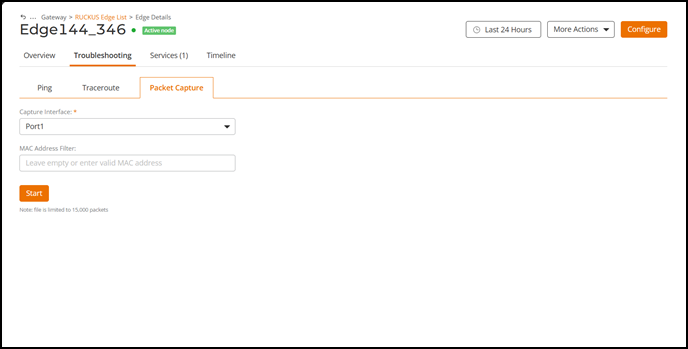
- Click the Troubleshooting tab, then click the Packet Capture sub-tab.
- Configure the following:
- Capture Interface: Select the LAN or access interface connected to the endpoint network.
- (optional) MAC Address
Filter: Enter a MAC address to limit the packet capture
output to traffic associated with a specific device. The field accepts
multiple MAC address formats (for example, colon-, hyphen-,
dot-separated, or continuous string). The filter matches MAC addresses
observed at the capture interface, including unicast, broadcast, and
multicast traffic.
Note: The filter applies to MAC addresses visible at the capture point. In encapsulated traffic (for example, VXLAN), inner frame MAC addresses may not be matched.
- Click Start.
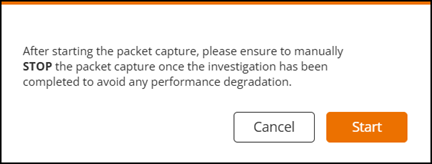
- Click Start to confirm.
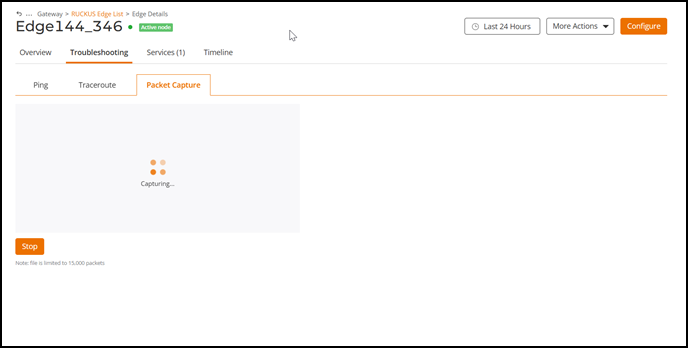
- Click Stop when the captured packets are sufficient.
- Repeat the capture on the WAN or
uplink interface using the same MAC address.
- If a MAC address filter is applied, the capture is limited to packets from the specified device.
- If a MAC address filter is not provided, the capture includes packets from all applicable devices.
The packet capture .pcap file is automatically downloaded in a compressed .tar.gz file to your local device. Extract the .pcap file and view the .pcap file content using a packet analysis tool of your choosing.
If file generation or retrieval fails, the UI displays an error message and returns to the initial Packet Capture view (ready for a new packet capture).
- View the capture file and verify DHCP exchange:
- Interpret results:
- Retain the capture files for
further analysis.The packet capture confirms whether DHCP messages are exchanged, allowing identification of where the IP assignment process fails.