Managing DHCP Leases for Edge Device Segments
The DHCP lease table provides real-time
visibility into IP address assignments, lease duration, and client status across configured
network segments. The DHCP Lease table displays DHCP lease information for devices
connected
to a segment and provides options to filter, group, and manage leases.
Attention: Changing the NAT session limit via the command-line interface (CLI)
clears all existing sessions and static mappings. This action will cause immediate
disconnection of active traffic, including SSH sessions.
Note: While
the lease table displays data per segment, DHCP message counters (such as Request,
Offer, and Ack) are global and provide aggregate data across all segments on the
Edge node.
- From the navigation bar, select
and click the
 icon to expand the cluster details for the necessary Edge cluster, then click on
the hyperlinked name of the specific Edge device.
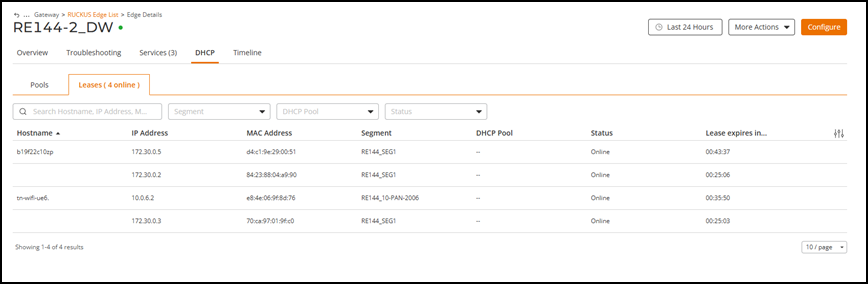
- Click the DHCP tab, then click the Leases sub-tab.
- Review the following fields to monitor client connectivity:
- Hostname: The name of the connected client device.
- IP Address: The IP address assigned to the client from the DHCP pool.
- MAC Address: The hardware address of the client device.
- Segment: The specific network segment to which the client belongs.
- DHCP Pool: The name of the pool from which the IP address was allocated.
- Status: The current state of the lease (for example, Active, Expired, or Reserved).
- Lease expires in: The time remaining until the lease expires.
- (Optional) To manage a specific lease, check the checkbox next to the client entry and do one of the following: