Downgrading RUCKUS Edge Firmware for a Venue
A firmware downgrade reverts all RUCKUS
Edge devices within a selected Venue to their previous firmware version. This process
allows
you to restore a known stable state if a recent upgrade causes issues or if specific
legacy
compatibility is required.
- From the navigation bar, select
, then click the RUCKUS Edge Firmware
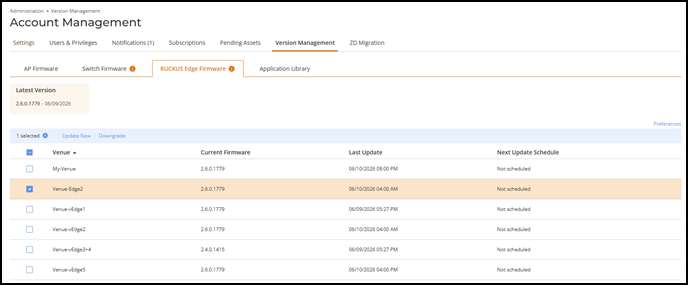
sub-tab.The RUCKUS Edge Firmware sub-tab is displayed with the following information:
- Latest Version: The latest firmware version recommended by RUCKUS One for active and legacy devices and the date on which the recommended release was made available.
- Venue: The name of the venue.
- Current Firmware: The firmware version currently running in that venue.
- Last Update: The date when the firmware was updated for the venue.
- Next Update Schedule: The date of the next scheduled firmware update, if scheduled.
An
 icon in the tab name provides a visual indicator when new updates are
available; pausing your cursor over the icon displays text stating the same.
- In the venue list, select the checkbox for the Venue you want to downgrade.
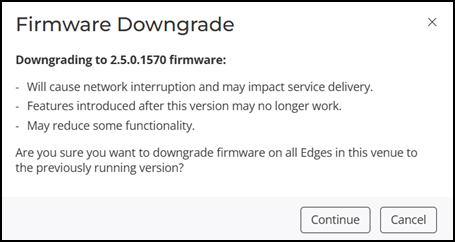
- Click Downgrade.
- Click Continue.
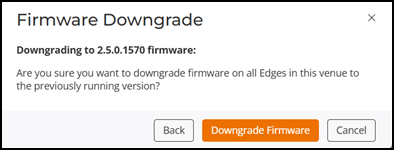
- Click Downgrade
Firmware to initiate the process.The controller sends the downgrade request to all RUCKUS Edge devices in the Venue. The devices will reboot and resume operation using the previous firmware version.