Assigning a Segment Configuration to an Edge Cluster Port
A Segment Group must be assigned to an
Edge cluster before the configured VLAN segments, gateway settings, and DHCP services
can be
deployed on the Edge devices.
- On the RUCKUS One navigation bar, select .
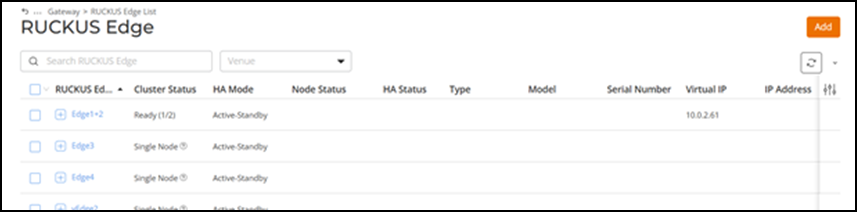
- Click the checkbox for the necessary RUCKUS Edge cluster from the list, then click Run Cluster & RUCKUS Edge Configuration Wizard.
- Select LAG, Port,
Sub‑interfaces & Virtual IP Settings, and then click
Next.The LAG Settings page is displayed.
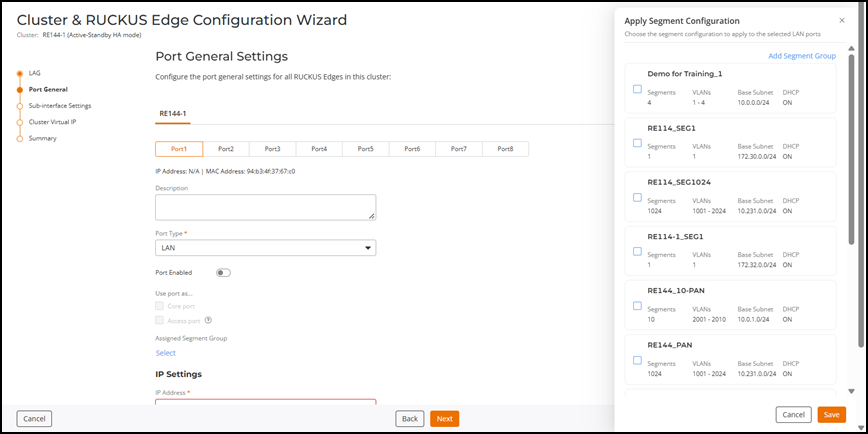
- Click Next.The Port General Settings page is displayed.
- For the Assigned Segment Group, click Select.
- Select the checkbox alongside the Segment Groups and click Save.
- Complete the remaining wizard steps and click Apply to
save the cluster configuration.Note: Ensure that VLAN segment associations to LAN ports and LAGs are identical on both Edge nodes in the cluster. Consistent port mappings are required for proper high-availability operation and failover.
- Click Next, until you reach the Cluster
Virtual IP page to proceed with Cluster Virtual IP
configuration.Refer to Configuring Cluster Virtual IP, for more information.