Troubleshooting an Endpoint that Cannot Reach the External Network
Upstream connectivity issues occur when an
endpoint communicates locally but cannot reach external resources. Packet capture
using a
MAC address filter verifies whether endpoint traffic is forwarded from the LAN interface
to
the WAN interface.
Note: Traffic must be validated on both LAN and WAN interfaces to
confirm forwarding behavior across the Edge device.
- From the navigation bar, select
and click the
 icon to expand the cluster details for the necessary Edge cluster, then click on
the hyperlinked name of the specific Edge device.
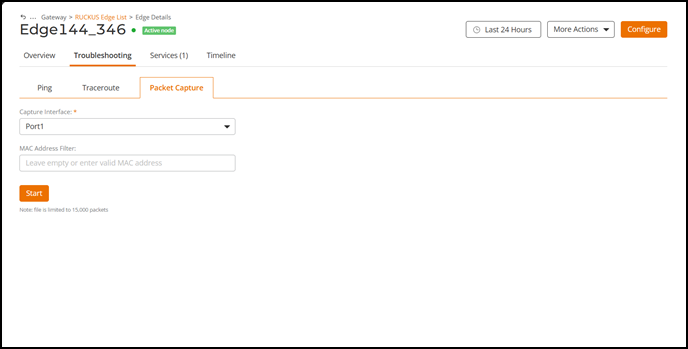
- Click the Troubleshooting tab, then click the Packet Capture sub-tab.
- Configure the following:
- Capture Interface: Select the LAN or access interface connected to the endpoint network.
- MAC Address
Filter: Enter the endpoint MAC address. Ensure the value
contains exactly 12 hexadecimal characters; the field accepts multiple
MAC address formats (for example, colon-, hyphen-, or dot-separated, or
continuous string).
Note: The filter applies to MAC addresses visible at the capture point. In encapsulated traffic (for example, VXLAN), inner frame MAC addresses may not be matched.
- Click Start.
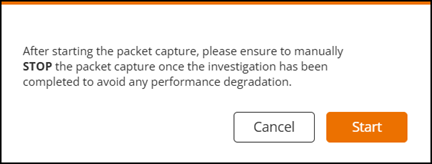
- Click Start to confirm.
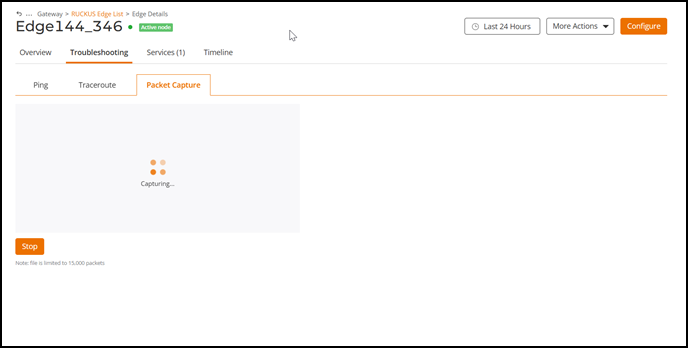
- Click Stop when the captured packets are sufficient.
- Repeat the capture on the WAN or
uplink interface using the same MAC address.
- If a MAC address filter is applied, the capture is limited to packets from the specified device.
- If a MAC address filter is not provided, the capture includes packets from all applicable devices.
The packet capture .pcap file is automatically downloaded in a compressed .tar.gz file to your local device. Extract the .pcap file and view the .pcap file content using a packet analysis tool of your choosing.
If file generation or retrieval fails, the UI displays an error message and returns to the initial Packet Capture view (ready for a new packet capture).
- Compare results:
- Retain the capture files for
further analysis.The packet captures determine whether the Edge device forwards endpoint traffic to upstream networks.