Viewing Segment Group Details
A Segment Group provides centralized
management for VLAN-based network segmentation within the Edge Gateway Service. You
can view
Segment Group details to verify segment configuration, DHCP settings, VLAN assignments,
and
associated Edge clusters.
Complete the following steps to view Segment Group details:
- From the navigation bar, select
.The My Services page is displayed.
- In the My
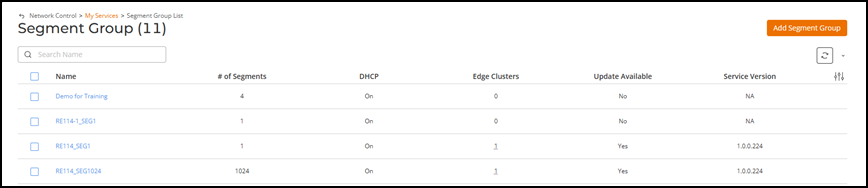
Services page, click the Segment Group tile. The Segment Group page is displayed. The table lists all of the Segment Groups defined in the RUCKUS One account, including basic configuration and associated clusters.
You can use the Search option to display only the table entries matching the specified name; enter a minimum of two characters.
You can customize which fields appear in the table by clicking the
 icon and selecting or deselecting the desired column names. Drag and drop
individual column names up or down the list to customize the left‑to‑right
column display in the table. Optionally, you can click Reset to
default to restore the default subset of columns.
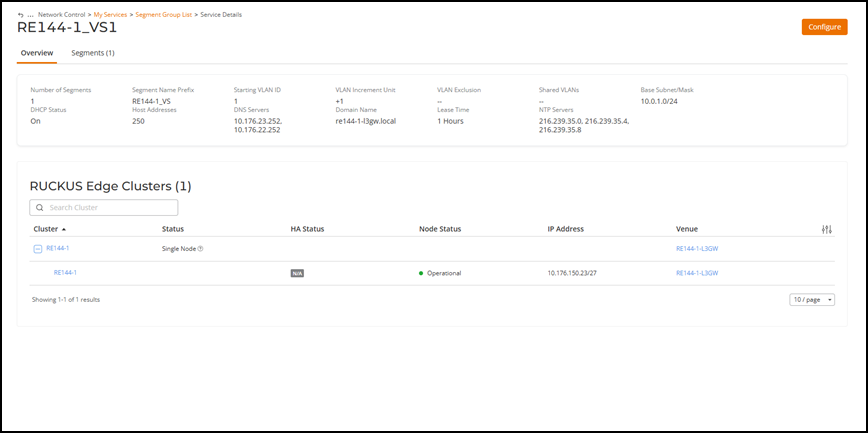
- In the Name column, click on the name of the policy to view additional details.
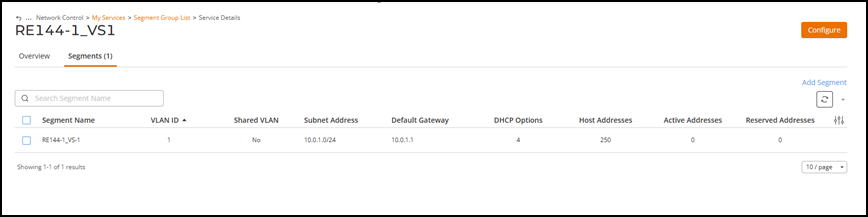
- Select the Segments tab to view the list of Segments in that group.