Creating a Syslog Server Policy

You can configure primary and secondary syslog servers to log the syslog messages; defining two servers ensures that the messages are not lost due to the temporary unavailability of one syslog server.
To enable DMCA Compliance Connection Logging on RUCKUS Edge, you must configure a remote Syslog Server policy.
Complete the following steps to create a Syslog Server policy:
  1. On the RUCKUS One navigation bar, select Network Control > Service Catalog.
    This displays the Service Catalog page.
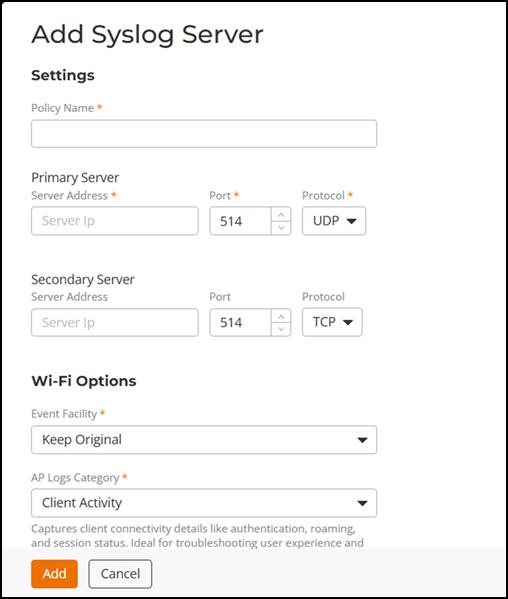
  2. Find the Syslog Server tile and click Add. The Add Syslog Server page is displayed.
  3. Complete the following fields:

    Adding a Syslog Server

    1. Policy Name: Enter a unique, descriptive name for the Syslog Server policy.
    2. Primary Server
      • Server Address: Enter the IPv4 address or FQDN of the primary remote Syslog server.
      • Port: Specify the listening port on the primary Syslog server. The default port is 514.
      • Protocol: Select the transport layer protocol used to transmit logs to the primary server.
    3. Secondary Server
      • Server Address: Enter the IPv4 address or FQDN of the secondary (backup) Syslog server.
      • Port: Specify the listening port on the secondary Syslog server. The default port is 514.
      • Protocol: Select the transport protocol for the secondary server.
  4. Click Add.
    The Syslog Server is created and is displayed on the Syslog Server page.