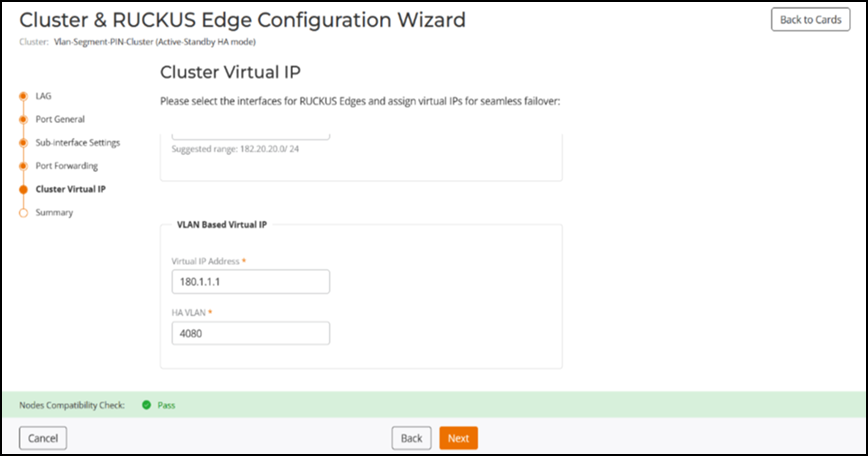
Configuring Cluster Virtual IP
- Click Select
Interface.The Select Interfaces sidebar is displayed.
- Select the interface from the Select Port drop-down.
- Click OK.
- Configure the following:
- Virtual IP Address, enter the virtual IP address for the RUCKUS Edge cluster.
- VLAN Based Virtual IP
- Virtual IP Address: Specify the virtual IP address used by the RUCKUS Edge cluster. The virtual IP automatically moves between active and standby nodes during failover, providing uninterrupted network access.
- HA VLAN: Specify the VLAN used for high availability communication between the RUCKUS Edge nodes. This VLAN carries VRRP advertisements and redundancy traffic required for failover operations. The default HA VLAN is 4080, but a custom VLAN can be configured if required.
- Failover
Settings, slide the marker on the HA
Timeout timeline bar to adjust the amount of time
allowed to elapse before triggering a failover.
Note: An HA failover time of 6 seconds or longer is recommended for RUCKUS Edge use-cases. A timer set to less than this is very aggressive and could potentially cause VRRP issues in some networks. HA timeout refers to the time period within which a node must receive a periodic heartbeat signal from the active node. If the timer expires prior to receiving a heartbeat signal, then the system initiates the failover process to select the next active node and maintain system functionality.
- Click Next.The Summary page is displayed.