Workflow of Personal Identity Network Service Creation
Creating a Personal Identity Network has a
recommended sequence.
- RUCKUS Edge cluster should be deployed to the venue where clients will be segmented.
- Property Management
Service for the venue should be already enabled. Enabling Property
Management for a venue requires creating an Identity Group, creating DPSK
services associated with the Identity Group, and associating the the Identity
Group with the Venue.
Note: The Identity Group cannot be changed once Property Management has been enabled.
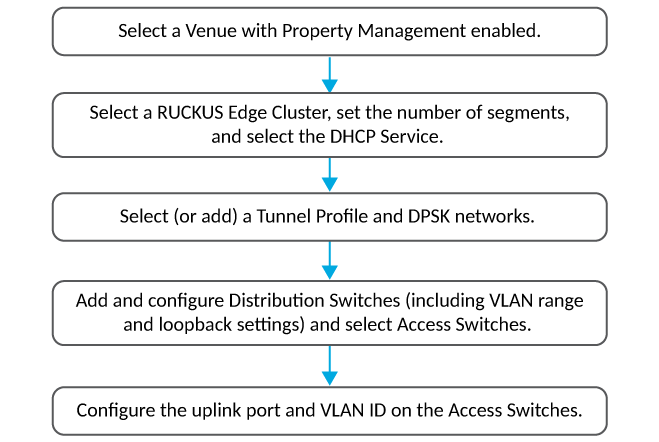
Note: If you have no switch under the
selected venue, then skip steps 4 and 5.
To ensure optimal network configuration, follow these steps for both wireless and wired access points:
Personal Identity Network Service Deployment
- Connect the RUCKUS Edgedevice, switches, and APs in the desired physical topology.
- Add the RUCKUS Edge device, switches, and APs in RUCKUS One for management.
- Create users/Personal Area Networks (PANs) and an associated PIN configuration for RUCKUS Edge, switches and APs.
- All the device configurations are applied or updated, and the network is ready for operation.
- UEs connect to the switches and APs, authentication is completed. The UEs are associated with the PAN and are online.