Adding a Property Unit
A property unit is a Personal Area Network
(PAN). PAN is described as a computer network that connects devices within a
meters.
- On the RUCKUS One navigation
bar, click Venue. This displays Venues page with the list of venues.
- Select and click on the Venue in the list.
- Click the Property Units tab.
- Click Add Unit to
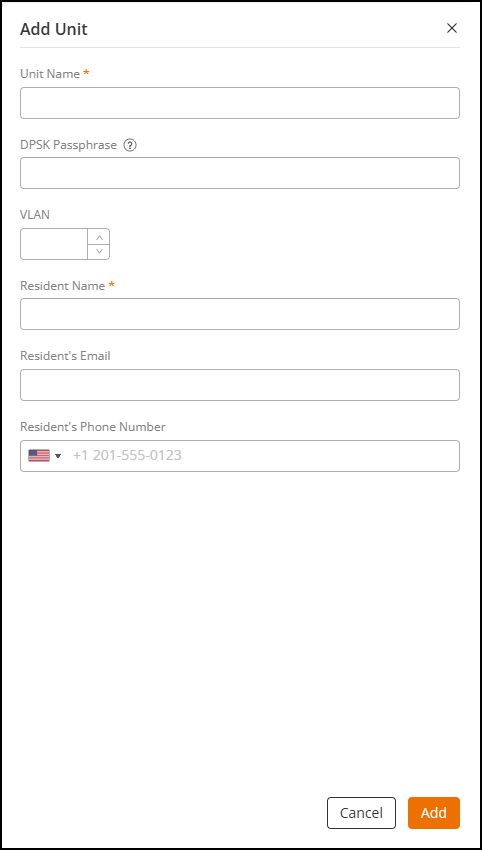
manually add a unit.The Add Unit dialog box is displayed.
- Complete the following
fields:
- Unit Name: Add a unit name for the propery units.
- DPSK Passphrase: Enter a passphrase minimum eight characters that you want users to provide before they can access the network.
- VLAN: Enter a VLAN ID (ranging from 1 through 4094).
- Resident Name: Enter a resident name.
- Resident's Email: Enter a resident email.
- Resident's Phone Number: Enter a resident phone number.
- After entering the above fields, click Add.This displays the unit details.
- In case of multiple units to be
added, click Import
from File.You can import multiple units at once, however it is not mandatory to import units in bulk.
- Complete the following steps to
import the unit.A CSV format of the file is available for download.
- Drag and drop a .CSV file or click Browse to locate the .CSV file, and click Open to upload it.
- (Optional) Click Download template to download the template or use file latest import.
- Using a spreadsheet application, open the .CSV file.
- Complete the following
fields to identify the Unit:
- Unit Name: Add a unit name for the propery units.
- DPSK Secret: Enter a passphrase minimum eight characters that you want users to provide before they can access the network.
- Unit VLAN: Enter a VLAN ID (ranging from 1 through 4094).
- Resident Name: Enter a resident name.
- Email: Enter a resident email.
- Phone Number: Enter a resident phone number.
- Save the .CSV file.
- Click
Import.If the import is successful, the Import Units from File dialog box displays with a message that units were imported successfully. If the import fails, the Import Units from Files dialog box displays an error message with details for each Units that failed to import.
- Click Add.The personal units are added to the property.