VLAN Mapping
For ICX 7150, ICX 7150-ES, ICX 7550, ICX 7650, and ICX 7850 devices, VLAN translation is enabled on a per-port basis, where a CVLAN is mapped to an SVLAN. The CVLAN tag in the packet is replaced with the configured SVLAN tag within the service provider network. When the packet leaves the service provider network, the SVLAN tag in the packet egressing will be replaced with the CVLAN tag.
Typically, the same VLAN mapping configuration must be done for all the edge ports to the same customer. This feature is supported on all the existing ICX hardware platforms.
For ICX 8100 and ICX 8200 devices, VLAN translation is available in global mode and mapping is removed at the interface configuration level. Therefore, the same CVLANs cannot be supported across multiple customers.
Basic VLAN Mapping Deployment
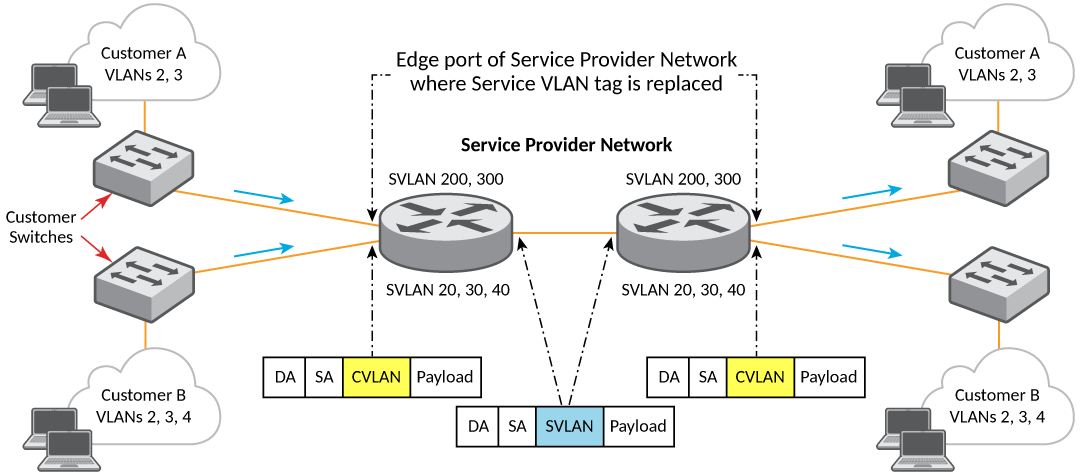
Customer A runs on VLAN 2 and VLAN 3. The service provider maps customer A’s VLAN 2 and VLAN 3 to service provider’s VLAN 200 and VLAN 300, respectively. This mapping is done on both edge ports on the service provider’s network, where the customer network is connected.
Similarly, Customer B runs on VLAN 2, VLAN 3 and VLAN 4. The service provider maps customer B’s VLAN 2, VLAN 3 and VLAN 4 to service provider’s VLAN 20, VLAN 30 and VLAN 40, respectively. This mapping is done on both edge ports on the service provider’s network, where the customer network is connected.
So, within the service provider network, traffic on VLAN 200 and VLAN 300 signifies traffic for Customer A and traffic on VLAN 20, VLAN 30, and VLAN 40 signifies traffic for Customer B.
VLAN Mapping Configuration for ICX 7150, ICX 7150-ES, ICX 7550, ICX 7650, and ICX 7850 Devices
VLAN mapping is enabled using the vlan-mapping command.
Execute the following steps to configure VLAN mapping for RUCKUS
ICX 7150, ICX 7150-ES, ICX 7550,
ICX 7650, and ICX 7850 devices.
- Enter the global configuration mode.
device# configure terminal
- Define the interface on which VLAN mapping needs to be
enabled.
device(config)# interface ethernet 1/1/33
device(config-if)# vlan-mapping cvlan 10 svlan 200
- If the port is not a member of the specified SVLAN ID,
execute the following command to add the port as a tag member of the SVLAN.
device(config-if)# vlan-config add svlan 300
Alternatively, you can go to the VLAN configuration mode and add the port as member of that VLAN.
device(config)# vlan 2
device(config-vlan-2)# tagged ethernet 1/1/34
To view the VLAN mapping configuration, run the
show vlan-mapping briefcommand. A sample output is as follows.device# show vlan-mapping brief Total number of vlan(s) mapped: 30 Total number of HW resource used: 50 Vlan-mapping enabled port(s): 1/1/33 1/1/34 lg10
Each port can have one or more VLAN mappings. If a packet reaches the port with a VLAN tag for which there is no mapping present, the packet flows through the service provider network, unmapped. If the network provider wants to restrict this behavior and wants all unmapped packets to be dropped, use the following configuration.
device(config-if)# vlan-mapping default drop
VLAN Mapping Configuration for ICX 8100 and ICX 8200 Devices
- Enter the global configuration
mode.
device# configure terminal
- Define the interface on which VLAN mapping
needs to be
enabled.
device(config)# vlan-mapping cvlan 10 svlan 200
- Enable VLAN mapping on the interface.
device(config-if-interface)# vlan-mapping enable
- To view the VLAN mapping
configuration, run the
show vlan-mapping briefcommand. A sample output is as follows.device(config)# show vlan-mapping brief Total number of vlan(s) mapped: 1 Total number of HW resource used: 1 Vlan-mapping enabled port(s): 1/1/1 1/1/2 CVLAN SVLAN 10 200
VLAN Mapping Considerations
- VLAN mapping is not supported in an untagged port.
- CVLAN to SVLAN mapping is always one to one and exclusive for each interface. This means, on a specific interface for a specific CVLAN, there can only be one SVLAN mapped and vice versa. On an interface, multiple CVLANs cannot be mapped to the same SVLAN, and the same CVLAN cannot be mapped to multiple SVLANs.
- Both network start point and end point interfaces must have the same VLAN mapping configuration for translating CVLANs to SVLANs and vice versa.
- If incoming customer traffic is already double tagged, then the mapping is done on the outer tag.
- Tag profile cannot be used in conjunction with VLAN mapping on an interface. This means, the interface on which VLAN-mapping is enabled must not be enabled for tag profile. The default tag in the packet should be 8100 if it should be considered for VLAN mapping.
- VLAN mapping cannot coexist with the following features: PMS, PVLAN, selective Q-in-Q, tag profile-based Q-in-Q, and dot1x.
- For all forwarding (L2, L3 and other pipelines in packet processor) and L3 purposes, SVLAN is used.
- For ICX 8100 and ICX 8200 devices VLAN mapping is applicable to all VLAN mapping enabled ports.
Scaling Considerations for ICX 7150, ICX 7150-ES, ICX 7550, ICX 7650, and ICX 7850 Devices
The maximum number of CVLAN to SVLAN mappings per port is 10. The maximum number of VLAN mappings which can be configured in a system is 1024 for all devices except ICX 7150-ES, which is 64.
A maximum 10 VLAN mappings can be configured on an interface. However, a typical deployment scenario will need only two or three VLAN mappings per interface. The number of VLAN mappings on a LAG is equal to number of member ports multiplied by the number of CVLAN mappings configured on the LAG interface. For example, if a LAG has 6 ports and 10 CVLANs are mapped to SVLANs, the total number of mappings is considered as 60.
Scaling Considerations for ICX 8100 and ICX 8200 Devices
The maximum number of VLAN mappings which can be configured in a system is 1024.