Configuration Example for STP Load Sharing
The following figure shows another example of a STP per VLAN group implementation.
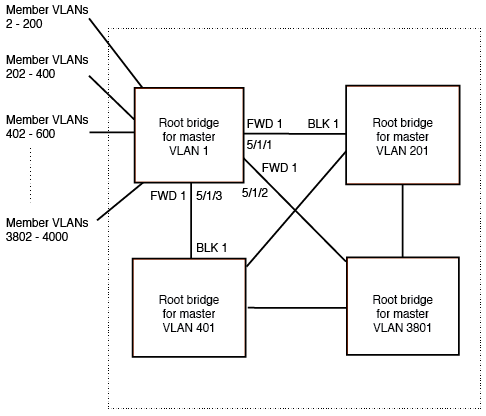
In this example, each of the devices in the core is configured with a common set of master VLANs, each of which contains one or more member VLANs. Each of the member VLANs in an STP group runs the same instance of STP and uses the STP parameters configured for the master VLAN.
The STP group ID identifies the STP instance. All VLANs within an STP group run the same instance of STP. The master VLAN specifies the bridge STP parameters for the STP group, including the bridge priority. In this example, each of the devices in the core is configured to be the default root bridge for a different master VLAN. This configuration ensures that each link can be used for forwarding some traffic. For example, all the ports on the root bridge for master VLAN 1 are configured to forward BPDUs for master VLAN spanning tree. Ports on the other devices block or forward VLAN 1 traffic based on STP convergence. All the ports on the root bridge for VLAN 2 forward VLAN 2 traffic, and so on.
All the ports are tagged. The ports must be tagged so that they can be in both a member VLAN and the member's master VLAN. For example, port 1/1/1 - and ports 5/1/1, 5/1/2, and 5/1/3 are in member VLAN 2 and master VLAN 1 (since master VLAN a contains member VLAN 2).
Here are the commands for configuring the root bridge for master VLAN 1 in STP per VLAN Group Example for STP per VLAN group. The first group of commands configures the master VLANs. Notice that the STP priority is set to a different value for each VLAN. In addition, the same VLAN has a different STP priority on each device. This provides load balancing by making each of the devices a root bridge for a different spanning tree.
device(config)# vlan 1
device(config-vlan-1)# spanning-tree priority 1
device(config-vlan-1)# tag ethernet 1/1/1 ethernet 5/1/1 to 5/1/3
device(config-vlan-1)# vlan 201
device(config-vlan-201)# spanning-tree priority 2
device(config-vlan-201)# tag ethernet 1/1/2 ethernet 5/1/1 to 5/1/3
device(config-vlan-201)# vlan 401
device(config-vlan-401)# spanning-tree priority 3
device(config-vlan-401)# tag ethernet 1/1/3 ethernet 5/1/1 to 5/1/3
...
device(config-vlan-3601)# vlan 3801
device(config-vlan-3801)# spanning-tree priority 20
device(config-vlan-3801)# tag ethernet 1/1/20 ethernet 5/1/1 to 5/1/3
device(config-vlan-3801)# exit
The next group of commands configures VLAN groups for the member VLANs. Notice that the VLAN groups do not contain the VLAN numbers assigned to the master VLANs. Also notice that no STP parameters are configured for the groups of member VLANs. Each group of member VLANs will inherit its STP settings from its master VLAN.
Set the bridge priority for each master VLAN to the highest priority (1) on one of the devices in the STP per VLAN group configuration. By setting the bridge priority to the highest priority, you make the device the default root bridge for the spanning tree. To ensure STP load balancing, make each of the devices the default root bridge for a different master VLAN.
device(config)# vlan-group 1 vlan 2 to 200
device(config-vlan-group-1)# tag ethernet 1/1/1 ethernet 5/1/1 to 5/1/3
device(config-vlan-group-1)# vlan-group 2 vlan 202 to 400
device(config-vlan-group-2)# tag ethernet 1/1/2 ethernet 5/1/1 to 5/1/3
device(config-vlan-group-2)# vlan-group 3 vlan 402 to 600
device(config-vlan-group-2)# tag ethernet 1/1/3 ethernet 5/1/1 to 5/1/3
...
device(config-vlan-group-19)# vlan-group 20 vlan 3082 to 3282
device(config-vlan-group-20)# tag ethernet 1/1/20 ethernet 5/1/1 to 5/1/3
device(config-vlan-group-20)# exit
The following group of commands configures the STP groups. Each STP group in this configuration contains one master VLAN, which contains a VLAN group. This example shows that an STP group also can contain additional VLANs (VLANs not configured in a VLAN group).
device(config)# stp-group 1
device(config-stp-group-1)# master-vlan 1
device(config-stp-group-1)# member-group 1
device(config-stp-group-1)# member-vlan 4001 4004 to 4010
device(config-stp-group-1)# stp-group 2
device(config-stp-group-2)# master-vlan 201
device(config-stp-group-2)# member-group 2
device(config-stp-group-2)# member-vlan 4002 4003 4011 to 4015
device(config-stp-group-2)# stp-group 3
device(config-stp-group-3)# master-vlan 401
device(config-stp-group-3) #member-group 3
...
device(config-stp-group-19)# stp-group 20
device(config-stp-group-20)# master-vlan 3081
device(config-stp-group-20)# member-group 20