MVRP Application Example
This section describes one of the ways you can use MVRP in a network. Configuration Example: Implementing MVRP and Configuration Example: Implementing MVRP with Per-VLAN RSTP list the commands and configuration steps to apply MVRP in the network topology displayed in the following example.
The following figure shows an example of a network that uses MVRP. In this example, a core device is attached to three edge devices. Each of the edge devices is attached to other edge devices or host stations. The effects of MVRP in this network depend on the devices where the feature is enabled.
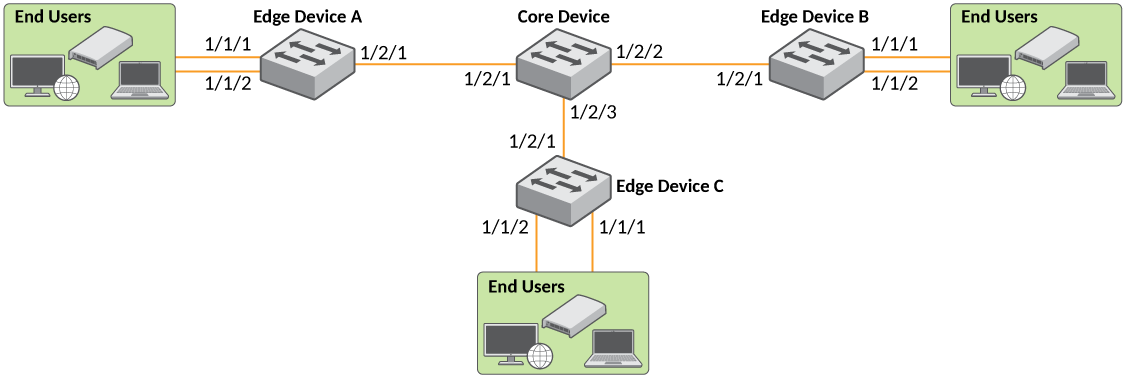
In this configuration, all ports on the core device are enabled to learn and advertise VLAN information. The edge devices are configured to advertise their VLAN configurations on the ports connected to the Core Device.
Configuration Details
In this configuration, the edge devices are statically (manually) configured with VLAN information. The core device dynamically configures itself to be a member of each of the edge device VLANs. The show vlan command will display the ports that have been dynamically learned through MVRP:
core-device# show vlan
<truncated output>
PORT-VLAN 20, Name mvrp_vlan20, Type dynamic, Priority level0, On
 Untagged Ports: None
   Tagged Ports: None
 Mac-Vlan Ports: None
  Dynamic Ports: (U1/M2)  1   2
     Monitoring: Disabled
PORT-VLAN 30, Name mvrp_vlan30, Type dynamic, Priority level0, On
 Untagged Ports: None
   Tagged Ports: None
 Mac-Vlan Ports: None
  Dynamic Ports: (U1/M2)  2  3
     Monitoring: Disabled
PORT-VLAN 40, Name mvrp_vlan40, Type dynamic, Priority level0, On
 Untagged Ports: None
   Tagged Ports: None
 Mac-Vlan Ports: None
  Dynamic Ports: (U1/M2)  1  3
     Monitoring: Disabled
VLAN 20 traffic can now travel through the core between edge devices A and B. Likewise, VLAN 30 traffic can travel between B and C and VLAN 40 traffic can travel between A and C. If an edge device is moved to a different core port or the VLAN configuration of an edge device is changed, the core device automatically reconfigures itself to accommodate the change.
Notice that each of the ports in the dynamically created VLANs is tagged. All MVRP VLAN ports configured by MVRP are tagged, to ensure that the port can be configured for additional VLANs.
show vlan
commands.