Tagged Port Using Default VLAN 1 as its Port Native VLAN
The following table shows an example of a PVST+ configuration that uses VLAN 1 as the untagged default VLAN and VLANs 2, 3, and 4 as tagged VLANs.
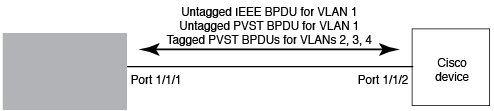
To implement this configuration, enter the following commands.
device(config)# vlan-group 1 vlan 2 to 4
device(config-vlan-group-1)# tagged ethernet 1/1/1
device(config-vlan-group-1)# exit
device(config)# interface ethernet 1/1/1
device(config-if-1/1/1)# pvst-mode
These commands configure a VLAN group containing VLANs 2, 3, and 4, add port 1/1/1 as a tagged port to the VLANs, and enable PVST+ support on the port. The implicit dual mode feature allows the port to send and receive untagged frames for the default VLAN (VLAN 1 in this case) in addition to tagged frames for VLANs 2, 3, and 4. Enabling the PVST+ support ensures that the port is ready to send and receive PVST+ BPDUs. If you do not manually enable PVST+ support, the support is not enabled until the port receives a PVST+ BPDU. The port can send and receive untagged frames for the default VLAN (VLAN1 in this case) in addition to tagged frames for VLANs 2,3 and 4.
The configuration leaves the default VLAN and the Port Native VLAN unchanged. The default VLAN is 1 and the Port Native VLAN also is 1. The implicit dual-mode feature supports untagged frames on the default VLAN only. Thus, port 1/1/1 can send and receive untagged BPDUs for VLAN 1 and can send and receive tagged BPDUs for the other VLANs.
Port 1/1/1 will process BPDUs as follows: