Configuration Example: Implementing MVRP with Per-VLAN RSTP
In the following figure, a core device is attached to three edge devices. Each of the edge devices is attached to other edge devices or host stations. The effects of MVRP in this network depend on the devices where the feature is enabled.
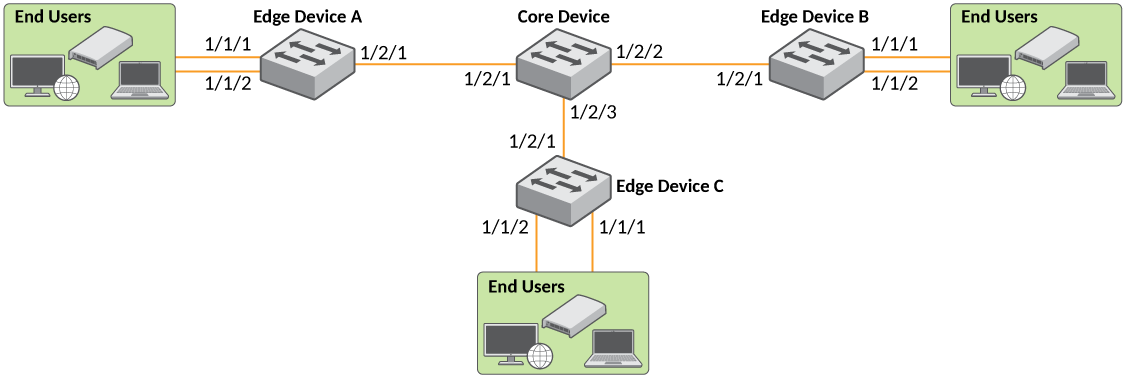
In this configuration, the edge devices advertise their statically configured VLANs to the core device. The Core Device does not have any statically configured VLANs, but learns the VLANs from the edge devices.
Per-VLAN Spanning Tree Protocol (PVST) is enabled
by default on the MVRP untagged VLAN. To enable the MVRP dynamic VLAN to be Rapid
Spanning Tree enabled, enable the MVRP functionality globally (using the
mvrp enable command), then configure the mvrp spanning-tree
802-1w command.
Enter the following commands on the Core Device.
core-device(config)# mvrp enable
core-device(config)# mvrp spanning-tree 802-1w
core-device(config)# interface ethernet 1/2/1 to 1/2/3
core-device(config-mif-1/2/1-1/2/3)# mvrp enable
core-device(config-mif-1/2/1-1/2/3)# mvrp point-to-point
Enter the following commands on Edge Device A.
Enable SSTP, SRSTP, STP, or RSTP on the edge devices (where VLANs are configured statically) according to the network requirement.
deviceA(config)# vlan 20
deviceA(config-vlan-20)# untagged ethernet 1/1/1
Added untagged port(s) ethernet 1/1/1 to port-vlan 20.
deviceA(config-vlan-20)# spanning-tree 802-1w

deviceA(config)# vlan 40
deviceA(config-vlan-40)# untagged ethernet 1/1/2
Added untagged port(s) ethernet 1/1/2 to port-vlan 40.
deviceA(config-vlan-40)# spanning-tree 802-1w

deviceA(config)# mvrp enable

deviceA(config)# interface ethernet 1/2/1
deviceA(config-if-e40000-1/2/1)# mvrp enable

deviceA(config-if-e40000-1/2/1)# mvrp point-to-point
deviceA(config-if-e40000-1/2/1)# exit
These commands statically configure two port-based VLANs and enable MVRP on port 1/2/1.
Enter the following commands on Edge Device B.
deviceB(config)# vlan 20
deviceB(config-vlan-20)# untagged ethernet 1/1/1
Added untagged port(s) ethernet 1/1/1 to port-vlan 20.
deviceB(config-vlan-20)# spanning-tree 802-1w

deviceB(config)# vlan 30
deviceB(config-vlan-30)# untagged ethernet 1/1/2
Added untagged port(s) ethernet 1/1/2 to port-vlan 30.
deviceB(config-vlan-30)# spanning-tree 802-1w

deviceB(config)# mvrp enable

deviceB(config)# interface ethernet 1/2/1
deviceB(config-if-e40000-1/2/1)# mvrp enable

deviceB(config-if-e40000-1/2/1)# mvrp point-to-point
deviceB(config-if-e40000-1/2/1)# exit
Enter the following commands on Edge Device C.
deviceC(config)# vlan 30
deviceC(config-vlan-30)# untagged ethernet 1/1/1
Added untagged port(s) ethernet 1/1/1 to port-vlan 30.
deviceC(config-vlan-30)# spanning-tree 802-1w

deviceC(config)# vlan 40
deviceC(config-vlan-40)# untagged ethernet 1/1/2
Added untagged port(s) ethernet 1/1/2 to port-vlan 40.
deviceC(config-vlan-40)# spanning-tree 802-1w

deviceC(config)# mvrp enable

deviceC(config)# interface ethernet 1/2/1
deviceC(config-if-e40000-1/2/1)#mvrp enable

deviceC(config-if-e40000-1/2/1)# mvrp point-to-point
deviceC(config-if-e40000-1/2/1)# exit
Use the command show mvrp to display the MVRP summary information:
core-device# show mvrp

---------------------------------------------------------------------------
Total configured mvrp ports    : 2
Global Status                  : Enabled
Dynamic VLAN Creation          : Enabled
Spanning-tree                  : Spanning-tree 802-1w
Join-timer(in ms)              : 200
Leave-timer(in ms)             : 1000
Leaveall-timer(in ms)          : 10000
MVRP untagged VLAN             : 1
MVRP Port(s)                   : ethe 1/2/1 to 1/2/3
MVRP active topology port(s)   : ethe 1/2/1 to 1/2/3
---------------------------------------------------------------------------
Use the command show mvrp ethernet to verify the MVRP configuration of specific ports including the applicant mode, forbidden VLANs, and point-to-point setting:
core-device# show mvrp ethernet 1/1/24
---------------------------------------------------------------------------
MVRP Status                : Enabled
Join-timer(in ms)          : 200
Leave-timer(in ms)         : 1000
Leave-all-timer(in ms)     : 10000
P2p                        : Yes
Applicant Mode             : Normal-participant
---------------------------------------------------------------------------
Registered Vlan(s)         : 1 20 30 40
Declared Vlan(s)           : 1
Forbidden Vlan(s)          :
---------------------------------------------------------------------------