IEEE 802.1Q Tagging
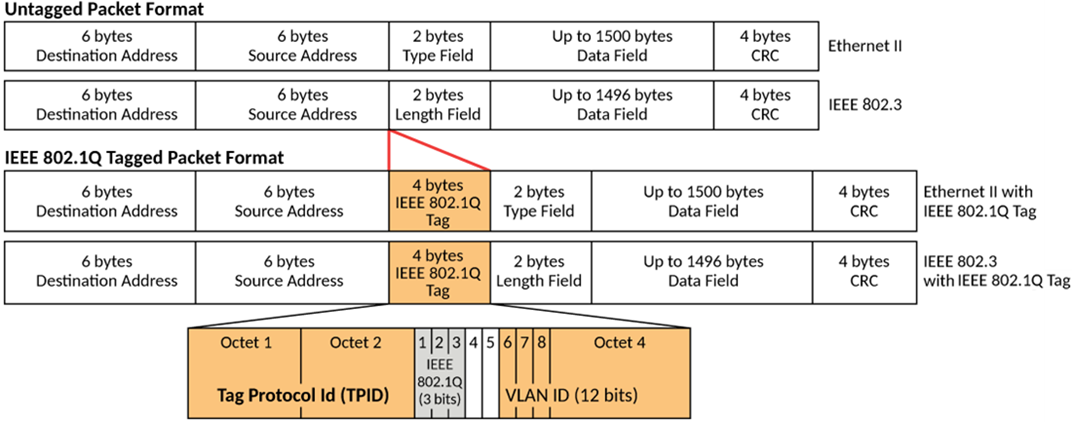
IEEE 802.1Q tagging is a standard that allows a networking device to add information to a Layer 2 packet in order to identify the VLAN membership of the packet. RUCKUS ICX devices tag a packet by adding a four-byte tag to the packet. The tag contains the tag value, which identifies the data as a tag, and also contains the VLAN ID of the VLAN from which the packet is sent.
- The default tag value is 8100 (hexadecimal). This value comes from the IEEE 802.1Q specification. You can change this tag value on a global basis on RUCKUS ICX devices, if needed, to be compatible with other vendors’ equipment. Refer to Support for IEEE 802.1ad (Q-in-Q) Tagging.
- The VLAN ID is determined by the VLAN on which the packet is being forwarded.
The following figure shows the format of packets with and without the IEEE 802.1Q tag. This format is universally recognized by VLAN-aware devices that conform to the IEEE 802.1Q standard. The IEEE 802.1Q tag adds a 32-bit field to Ethernet frames, consisting of:
- Tag Protocol Identifier (TPID): Always set to 0x8100 to identify the frame as tagged.
- Tag Control Information (TCI): Subdivided into:
If you configure a VLAN that spans multiple devices, you must use tagging if the port connecting to the other devices is a member of more than one port-based VLAN. If a port connecting one device to the other device is a member of only a single port-based VLAN, tagging is not required.
If you use tagging on multiple devices, each device must be configured for tagging and must use the same tagged VLANs in the ports that connect one device to the other. In addition, the implementation of tagging must be compatible on the devices. The tagging on all RUCKUS ICX devices is compatible.
The following figure shows an example of two devices that have the same Layer 2 port-based VLANs configured across them. Notice that only one of the VLANs requires tagging.
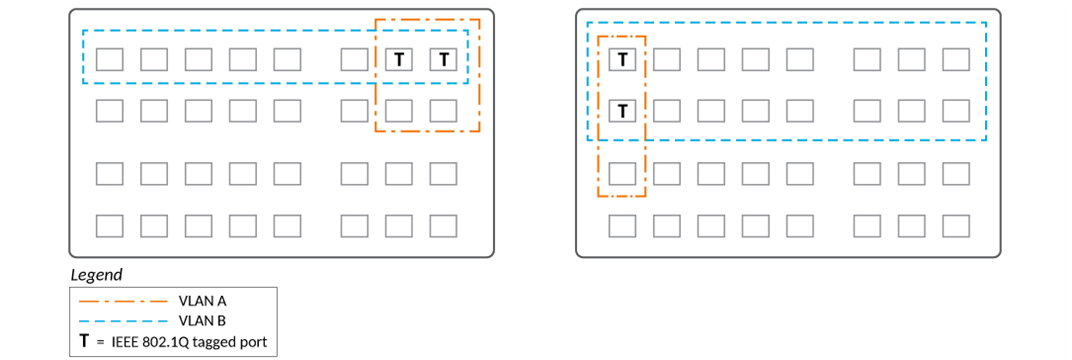
- Ports marked with T must use tagged configuration because they are members of multiple VLANs, such as VLAN A and VLAN B.
- Tagging ensures that incoming frames are correctly classified and forwarded to the appropriate VLAN.
- Without tagging, the switch cannot determine VLAN membership, and the frame is discarded.
- Ports assigned to only one VLAN do not require tagging.
- Use untagged configuration for ports dedicated to a single VLAN.
- Use tagged configuration when planning for future VLAN expansion or shared VLAN membership.