First Hop and Last Hop Router Support on MCT Cluster Devices for MCT VLANs
A multicast source device, acting as an MCT client, or connected to an MCT client switch, can forward the multicast traffic to any of the cluster devices. In order to provide sub-second convergence, the cluster device that is receiving the multicast traffic from a source on its CCEP, forwards the traffic over ICL to the cluster peer. The traffic is forwarded to the cluster peer irrespective of whether the cluster peer has any receivers for this traffic. Therefore, the multicast traffic from a MCT source client received by a cluster device can be forwarded to other MCT receiver clients by a peer cluster device.
Similarly, a Last Hop Router (LHR), a multicast receiver that is directly connected to a router via cable or switch, is supported for PIM cluster peers for MCT. The source traffic will ingress on the First Hop and then cross intermediate routers until it reaches the last hop router and the receiver receives the multicast packets.
The following illustration shows a single-tier MCT deployment in a 3-tier architecture. In this 1-tier MCT deployments, MCT is used at the distribution layers. Distribution switches are paired as an MCT cluster at tier-1. Each access switch is connected, via a LAG interface, as an MCT client to two distribution switches that are configured in an MCT cluster. Multicast Snooping is configured on the access switches for the access-VLANs. On the distribution switches that are MCT clusters, multicast routing is configured on these access MCT VLANs or VEs.
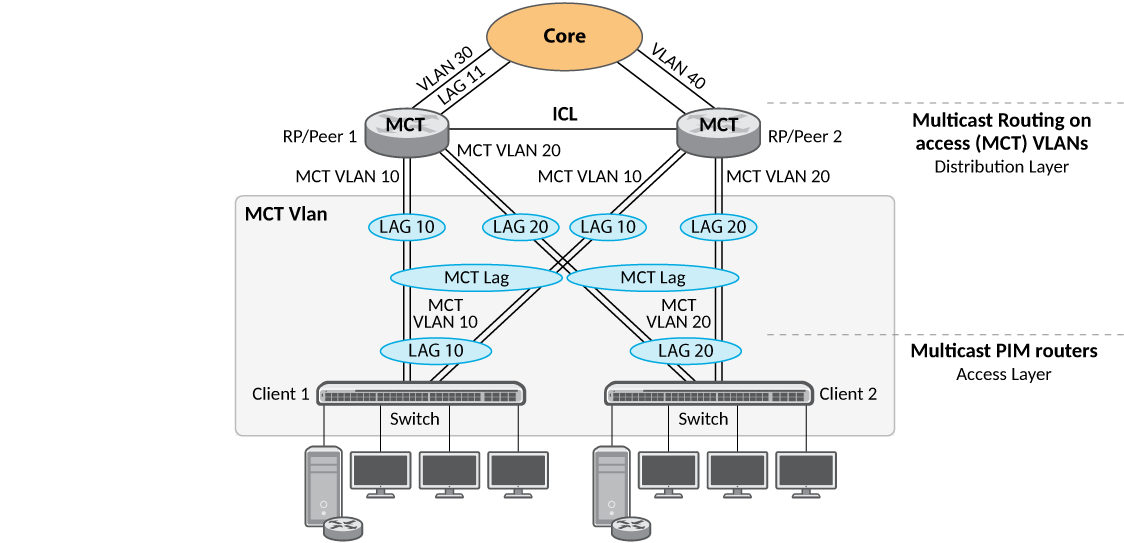
Configuration Example: Multicast Routing with FHR and LHR
The following example shows the configuration for multicast snooping for the 3-tier architecture depicted in Sample MCT Configuration in a 3-tier Architecture.
vlan 10 by port
 tagged lag 10
 multicast passive
!
vlan 20 by port
 tagged lag 20
 multicast passive
!
router pim
!
router ospf
 area 0
 no graceful-restart
 nonstop-routing
!
vlan 5 name session-vlan by port
 tagged lag 1
!
vlan 6 name keep-alive by port
 tagged lag 2
!
vlan 10 by port
 tagged lag 1 lag 10
!
vlan 20 by port
 tagged lag 1 lag 20
!
vlan 30 by port
 tagged lag 11
!
interface ve 5
 ip address 5.1.1.1 255.255.255.0
!
interface ve 10
 ip address 10.1.1.1 255.255.255.0
 ip pim-sparse
 ip ospf area 0
!
interface ve 20
 ip address 20.1.1.1 255.255.255.0
 ip pim-sparse
 ip ospf area 0
!
interface ve 30
 ip address 30.1.1.1 255.255.255.0
 ip pim-sparse
 ip ospf area 0
!
cluster mcast_cluster 4095
 rbridge-id 4090
 session-vlan 5
 keep-alive-vlan 6
 icl-fwd-delay 5
 ccep-up-delay 300
 icl icl-lag lag 1
 peer 5.1.1.2 rbridge-id 4091 icl icl-lag
 peer 5.1.1.2 timers keep-alive 10 hold-time 300
 deploy
 client ccep-1
  rbridge-id 1
  client-interface lag 10
  deploy
 client ccep-2
  rbridge-id 2
  client-interface lag 20
  deploy
!
router pim
!
router ospf
 area 0
 no graceful-restart
 nonstop-routing
!
vlan 5 name session-vlan by port
 tagged lag 1
!
vlan 6 name keep-alive by port
 tagged lag 2
!
vlan 10 by port
 tagged lag 1 lag 10
!
vlan 20 by port
 tagged lag 1 lag 20
!
vlan 40 by port
 tagged lag 12
!
interface ve 5
 ip address 5.1.1.2 255.255.255.0
!
interface ve 10
 ip address 10.1.1.2 255.255.255.0
 ip pim-sparse
 ip ospf area 0
!
interface ve 20
 ip address 20.1.1.2 255.255.255.0
 ip pim-sparse
 ip ospf area 0
!
interface ve 40
 ip address 40.1.1.1 255.255.255.0
 ip pim-sparse
 ip ospf area 0
!

cluster mcast_cluster 4095
 rbridge-id 4091
 session-vlan 5
 keep-alive-vlan 6
 icl-fwd-delay 5
 ccep-up-delay 300
 icl icl-lag lag 1
 peer 5.1.1.1 rbridge-id 4090 icl icl-lag
 peer 5.1.1.1 timers keep-alive 10 hold-time 300
 deploy
 client ccep-1
  rbridge-id 1
  client-interface lag 10
  deploy
 client ccep-2
  rbridge-id 2
  client-interface lag 20
  deploy
!
interface loopback 1
 ip address 1.1.1.1 255.255.255.255
 ip pim-sparse
 ip ospf area 0
!
router pim
 bsr-candidate loopback 1 32 255
 rp-candidate loopback 1
 rp-candidate add 224.0.0.0 4
!
router ospf
 area 0
 no graceful-restart
 nonstop-routing
!
vlan 30 by port
 tagged lag 11
!
vlan 40 by port
 tagged lag 12
!
vlan 50 by port
 tagged ethernet 1/2/2
!
interface ve 30
 ip address 30.1.1.2 255.255.255.0
 ip pim-sparse
 ip ospf area 0
!
interface ve 40
 ip address 40.1.1.2 255.255.255.0
 ip pim-sparse
 ip ospf area 0
!
interface ve 50
 ip address 50.1.1.1 255.255.255.0
 ip pim-sparse
 ip ospf area 0
!