IPSec over NAT
Using NAT, you can limit the number of public IP addresses owned by a user. In basic-NAT (one-to-one NAT), IP addresses are mapped one-to-one. However, an effective NAT method is Port Address Translation (PAT), where many private addresses map to a single public IP address.
An IPsec ESP packet does not contain port information like TCP and UDP, and, as a result, a NAT (PAT) device is unable to do mapping and drops the packet. This is overcome by the NAT Traversal (IPsec over NAT) feature, which encapsulates the ESP packet inside a UDP header.
The NAT traversal feature is enabled by default. In FIPS mode, the feature cannot be disabled. In non-FIPS mode, you can disable this feature if necessary.
How It Works
The IKEv2 control protocol discovers any NAT devices between IKE peers by sending new payloads called NAT Discovery (NAT-D) within IKE_SA_INIT messages. Each side sends hashes of SPI, IP address (tunnel addresses), and the port of both IKE peers (source and destination) in the NAT-D payload.
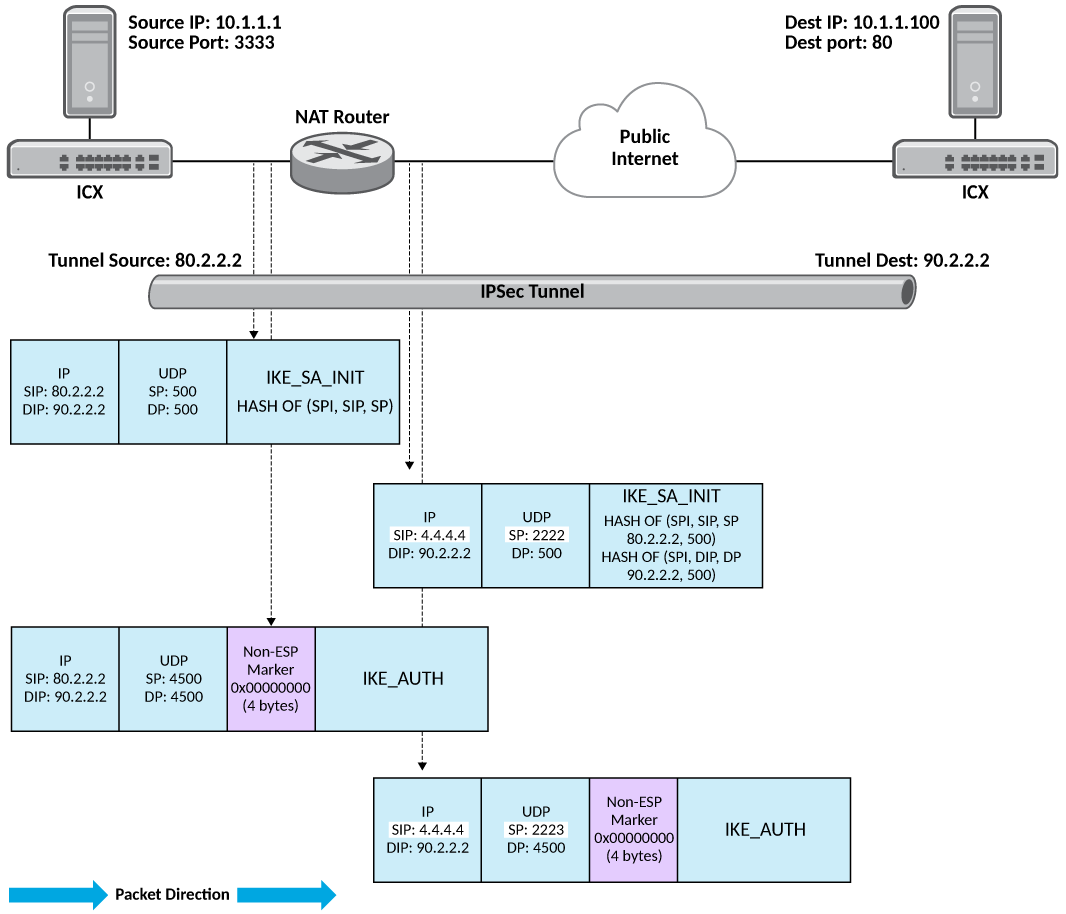
On the other side, again the hashes of IP address and port are calculated in the packet header. The re-calculated hashes are compared with the hashes received as part of the NAT-D payload. If they are different, it means the packet has undergone NAT. After this negotiation, the IPsec tunnel is established with UDP encapsulation. In UDP, both source and destination ports are set to 4500.
With UDP encapsulation, an ESP packet is treated like a UDP packet, and NAT is applied normally without affecting the ESP packet inside.
Packets are sent periodically to keep the NAT mappings alive. This is configured using
the
ikev2 nat keepalive command.
Configuring IPsec over NAT
The feature is enabled by default. To disable the feature, use the
ikev2 natdisable command.
device(config)# ikev2 nat-disable
The NO form of the command enables the feature.
device(config)# no ikev2 nat-disable
The
show ikev2 commands displays the
NAT-T enabled status as shown in the following example.
device# show ikev2
IKEv2 Global data:
Retry Count          : 5             Max Exchange Time       : 30
Retransmit Interval  : 5             Max SA                  : 256
Max SA In Nego       : 256           Total IPSEC Intf        : 2
Total Peers          : 2             Total IPSEC SA          : 2
Total IKE SA         : 2
NAT-T enabled        : True          NAT-T keepalive time    : 5 sec