Configuring Captive Portal (External Web Authentication)
On ICX switches web authentication is enabled at the VLAN level. A Captive Portal profile must be applied to the web authentication-enabled VLAN. For more information, refer to Creating captive portal profile for external web authentication.
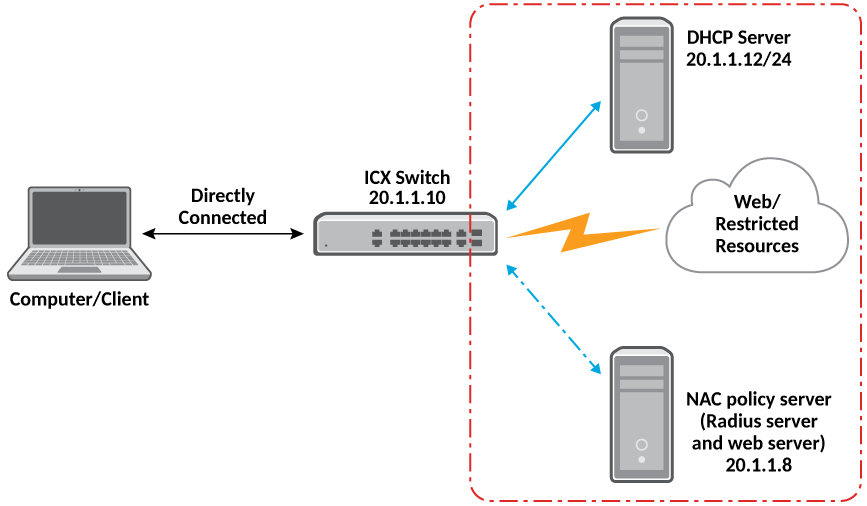
Complete the following steps to configure external Web Authentication on a device.
- Set up any global configuration required for the ICX device, RADIUS server, NAC policy
server, and other servers.
- On a Layer 2 switch, make sure the ICX switch has an IP address configured.
device# configure terminal
device(config)# ip address 20.1.1.10/24
- On a Layer 3 switch, assign an IP address to a virtual interface (VE) for each VLAN
on which external Web Authentication will be enabled.
device# configure terminal
device(config)# vlan 20
device(config-vlan-20)# router-interface ve20
device(config-vlan-20)# untagged ethernet 1/1/1 to 1/1/20
device(config-vlan-20)# interface ve20
device(config-vif-20)# ip address 20.1.1.10/24
- On a Layer 2 switch, make sure the ICX switch has an IP address configured.
- Configure the RADIUS server to authenticate the host username and passwords.
The server has both a RADIUS server and a web server. Use the following commands to make RADIUS configuration on ICX switch.
device(config)# radius-server host 20.1.1.8 auth-port 1812 acct-port 1813 default key 2 $d3NpZ0BVXFpJ web-auth
Note: The RADIUS key configured should be the same as the key configured in the external web server. - Configure Web Authentication to use secure (HTTPS) or non-secure (HTTP) login and
logout pages. By default, HTTPS is used.
Note: The protocol configured in the Captive Portal profile must be the same as the protocol configured as part of web management access.
To enable the non-secure web server on the switch, enter the following commands.
device(config)# web-management HTTP
device(config)# vlan 20
device(config-vlan-20)# webauth
device(config-vlan-20-webauth)# no secure-login
- Configure the key to access a secure web page using a certificate by performing one
of the following steps:
If the secure Web server is used, in order to access a secure web page, the web server needs to provide a key. This key is exchanged using a certificate. A certificate is a digital document that is issued by a trusted source that can validate the authenticity of the certificate and the web server that is presenting it. Therefore the switch must have a certificate for Web Authentication to work.
- Create a Web Authentication VLAN and enable Web Authentication on that VLAN.
- Attach the configured Captive Portal profile to the Web Authentication-enabled VLAN.
- Configure the Web Authentication mode as Captive Portal mode to authenticate the users in a VLAN through external Web Authentication.
- Configure the external Captive Portal on the NAC server to create a guest or web login page for external Web Authentication.