Switch Settings: Routed Interfaces
From the RUCKUS One web interface, you
can configure routed interfaces.
- In the
Dashboard, click Venues.
Alternatively, on the navigation bar, click Venues. The Venues page is displayed.
- Select the Venue
Name and click Edit.
Alternatively, select the Venue Name and click Configure.The Venue Details page is displayed.
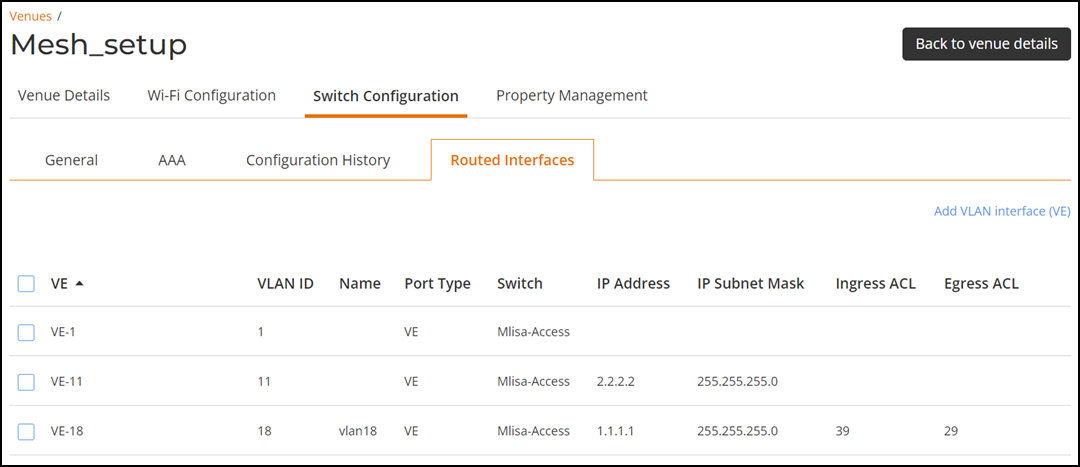
- Select the tab.
- Click Add VLAN Interface (VE) to add a VE.
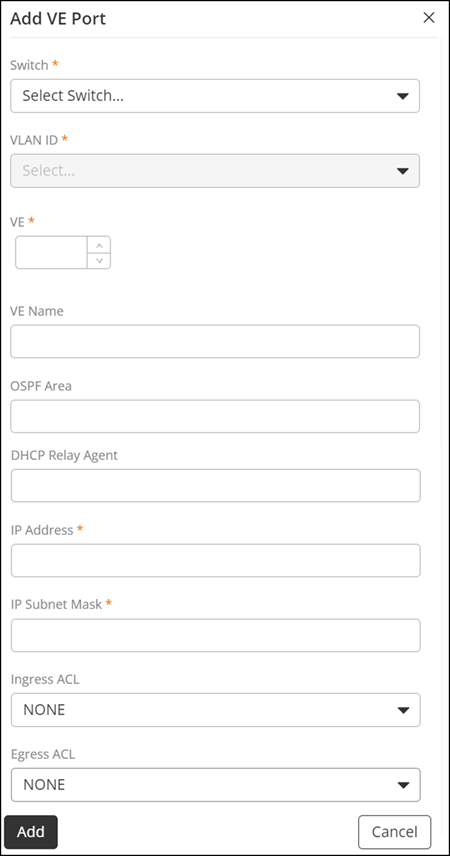
- Complete the following fields to add a VE:
- Switch: Select a switch from the drop down list.
- VLAN ID: Select a VLAN ID name from the drop down list.
- VE: By default, the selected VLAN ID number is automatically updated in this field.
- VE Name: Enter a name for the VLAN interface.
- OSPF Area: Enter a OSPF area number.
- DHCP Relay Agent: Enter a IP address for DHCP relay.
- IP Address: Enter an IP address.
- IP Subnet Mask: Enter an IP subnet mask.
- Ingress ACL: Select Ingress ACL number from the drop down list.
- Egress ACL: Select Egress ACL number from the drop down list.
- Click Save to add the VE. The added VE is dispalyed in the table.
- Complete the following steps to edit a VE:
- Complete the following steps to delete a VE: