Adding a Venue
You must add a venue before you can
connect your networking devices to RUCKUS One to offer Wi-Fi service. If you want
to assign
your access points to a venue other than the default, you can add a new venue.
Complete the following steps to add a venue.
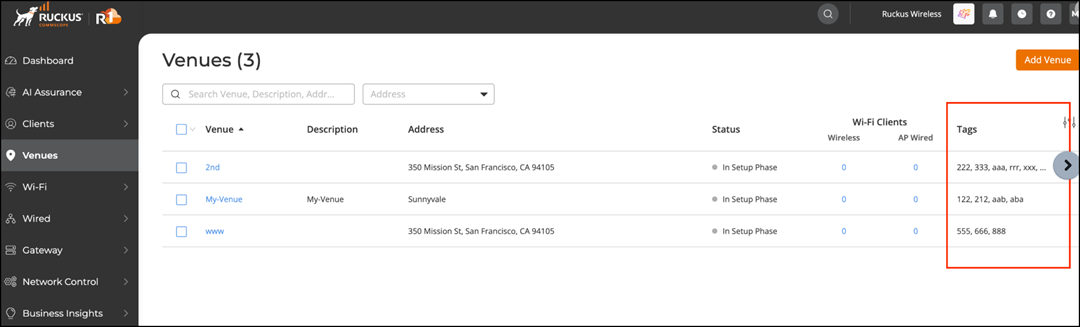
- From the RUCKUS One web interface, click Venues.
- In the upper-right corner of the page, click Add Venue.
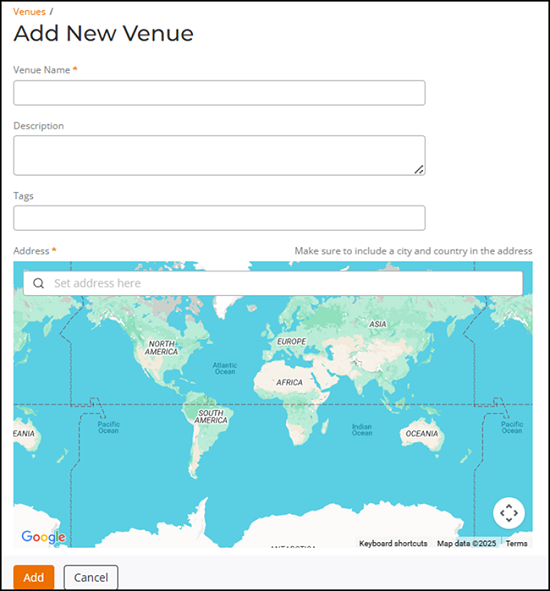
- (Required) In the Venue Name field, enter a name for the venue that you are creating.
- In the Description field, enter a brief description of the venue.
- In the Tags field, enter a tag that you can use to search the venue from the gobal search option on the RUCKUS One web interface.
- (Required) In the
Address field, enter the address where the venue will
be located.You can enter either a full or partial address. For example, if you enter 350 W Java Dr, the field will query all matching addresses on Google Maps and display them beneath the Address field. From the matching addresses, select the correct address.
- Click Add.