Using External DPSK with RADIUS Authentication
Using an external AAA server for managing
Dynamic Pre-Shared Keys provides several advantages to internal DPSKs stored on
the AP or
controller.
The external DPSK feature allows customers to exceed the maximum number of DPSKs that can be stored on the controller, and provides the option to store and manage DPSKs on the AAA server for distribution to multiple controllers.
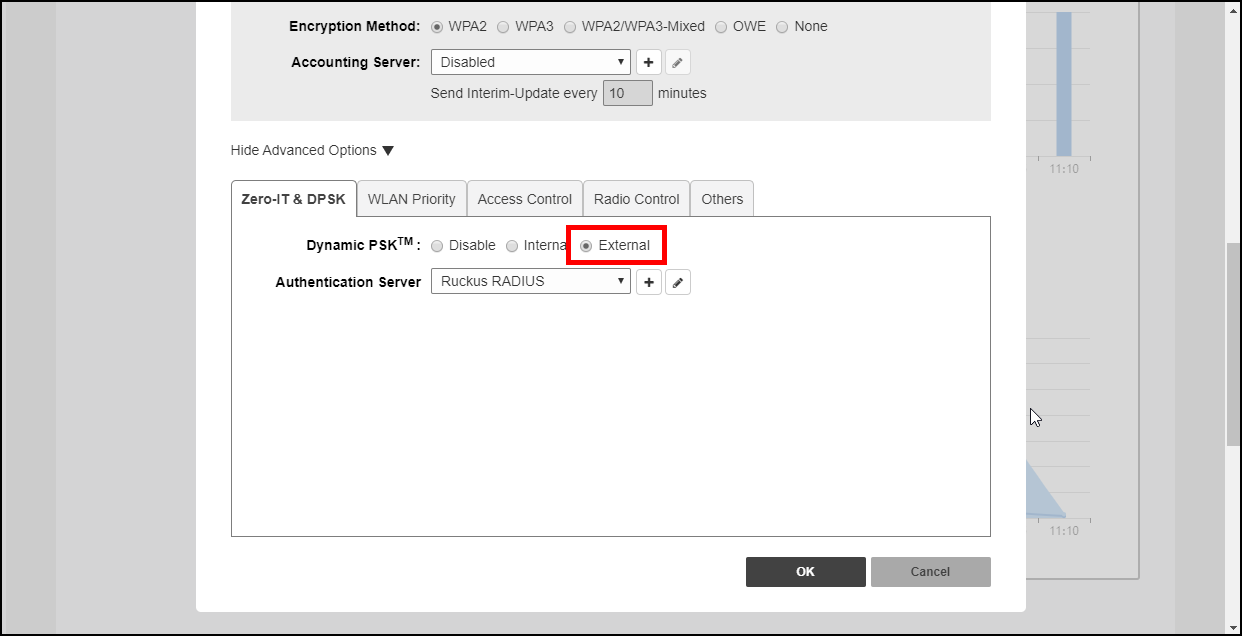
To enable external DPSK using an external authentication server:
- Go to WiFi Networks > Create/Edit WLAN > Advanced Options > Zero-IT & DPSK.
- In Dynamic PSK, select External.
- In Authentication Server, select or create an AAA server entry.
- Click OK.
- The controller will send
Access-Requestmessages to the RADIUS server with following attributes:Ruckus-SSID, Ruckus-BSSID, User-Name, Ruckus-Dpsk-Params. - The AAA server sends back a RADIUS
Access-AcceptorAccess-Rejectmessage with the following attributes:Access-Accept: Calling-station-id, Tunnel-Type, Tunnel-Medium-Type, Tunnel-Private-Group-Id, MS-MPPE-Recv-Key,Session-Timeout, Ruckus-User-Groups, User-Name. TheMS-MPPE-Recv-Keyis mandatory. - The AAA server generates a DPSK key (PMK) for each wireless station. This key is encrypted
and entered in the attribute
MS-MPPE-Recv-Key: PMK = PBKDF2_SHA1(PassPhrase, Wlan-SSID, Wlan-SSID-Len, 4096, 32). See RFC2548 Chapter 2.4.3. - The AAA server calculates the wireless station’s Pairwise Transient Key (PTK) from
the
Ruckus-Dpsk-Paramsattribute (AKM Suite, Cipher, Anonce, EAPOL-Key-Frame) in theAccess-Requestmessage and generates the PMK key, and finally verifies the Key MIC of the station. If it matches, the RADIUS server will send back anAccess-Acceptmessage with theMS-MPPE-Recv-Keyattribute. - With the DPSK keys generated managed by the AAA server, the controller's internal max DPSK limits are avoided and an unlimited number of DPSKs can be generated.