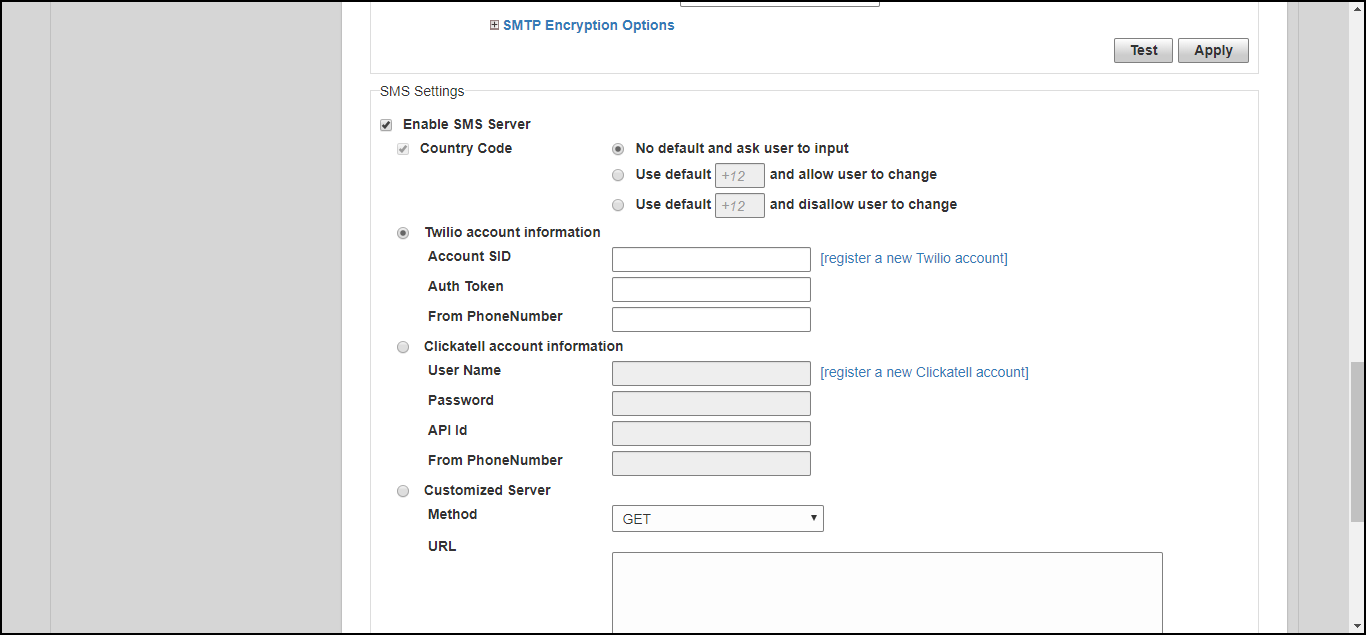
Configuring SMS Server Settings
In order for Unleashed to send guest pass codes to guest users via SMS, it needs to
have an SMS server configured.
To configure SMS server settings:
- Go to Admin & Services > System > System Info.
- In the SMS Settings section, enable the Enable SMS Server check box.
- In
Country Code, select one of the following options:
- CountryCode: This option is only available with "Customized Server" SMS server type (for Twilio and Clickatell, the country code is mandatory and cannot be unchecked). When unchecked, the guest registration page does not support country code input.
- No default and ask user to input: The guest registration page does not provide a default country code and the guest user is asked to input one.
- Use default and allow user to change: The guest registration page provides a default country code and allows the guest user to change it.
- Use default and disallow user to change: The guest registration page provides a default country code and the guest user is not allowed to change it.
- Select Twilio, Clickatell, or Customized Server, depending on your SMS service provider.
- Enter your Account SID, Auth Token and From Phone Number (Twilio) or your User Name, Password and API ID (Clickatell), or Method (Get or Post) and the URL for a custom SMS service provider.
- Click the Test button to test your settings.
- Once confirmed, click Apply to save your changes.