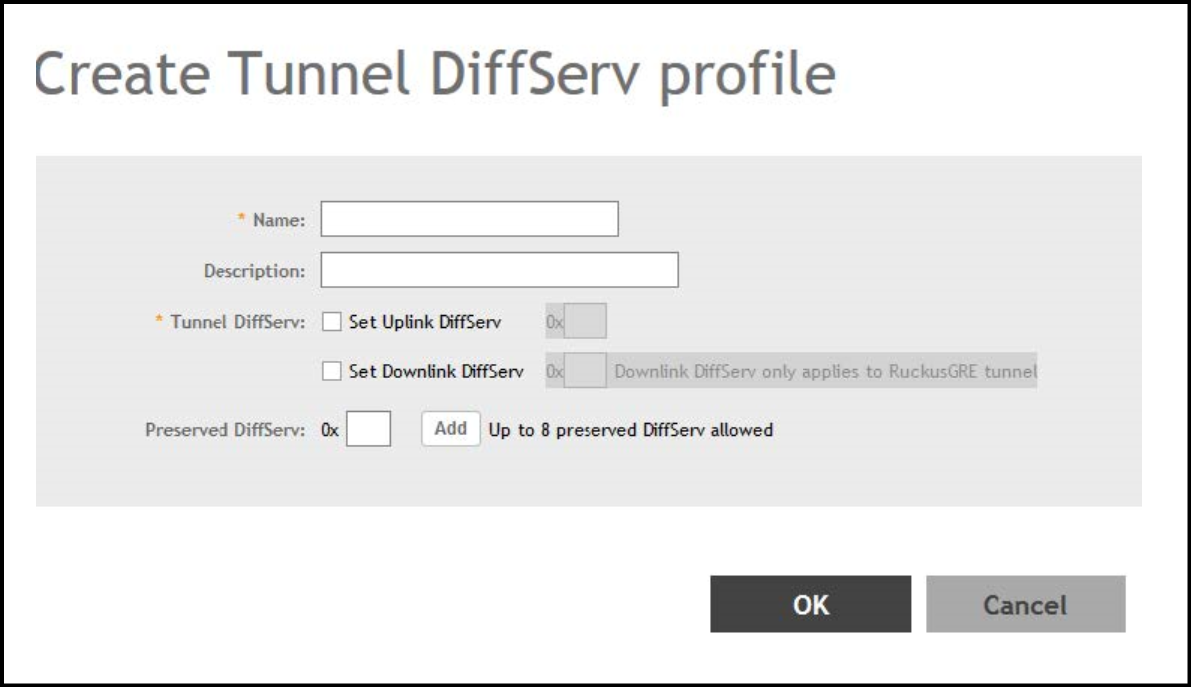
Creating a Tunnel DiffServ Profile
If
you want to configure the type of service (ToS) bit settings for the access-side
traffic
from RUCKUS
APs, complete the following steps to create a Differentiated Services (DiffServ)
profile.
This profile can only be applied to RuckusGRE and SoftGRE traffic.
- From the main menu, go to .
- Select the DiffServ tab, and then select the zone for which you want to create the profile.
- Click Create.
- Configure the following options:
- Name: Enter a name for the DiffServ profile that you are creating.
- Description: Enter a brief description for the DiffServ profile.
- Tunnel DiffServ: Configure the following options.
- Set Uplink DiffServ: Select the check box if you want to set the Differentiated Services field for uplink user traffic from RUCKUS APs towards either the controller or a third-party gateway using SoftGRE, and enter the desired value to be set by the RUCKUS AP.
- Set Downlink DiffServ: Select the check box if you want to set the Differentiated Services field for downlink user traffic from the controller towards the AP, and enter the desired value to be set by the RUCKUS AP.
-
Preserved DiffServ: Configure up to eight entries in the preserved DiffServ list. The Preserved DiffServ list allows the preservation of values that have been already marked in incoming packets either in uplink or downlink traffic.
- Click OK.