Enabling an Owner VRRP Device
This task is performed on the device that is designated as the owner VRRP device because the IP address of one of its physical interfaces is assigned as the IP address of the virtual router. For example, Router 1 is the owner VRRP device in the figure that follows. For each VRRP session, there are master and backup routers, and the owner router is elected, by default, as the master router.
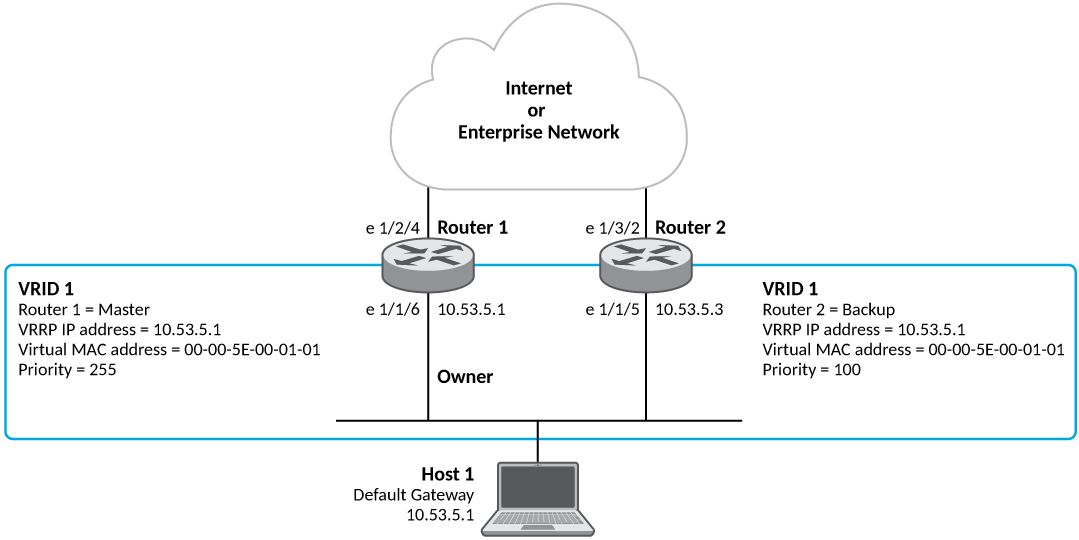
- On the device designated as the owner VRRP device, from privileged EXEC mode, enter
global configuration mode by issuing the
configure terminalcommand. - Globally enable VRRP.
- Configure the Ethernet interface link for Router 1.
- Configure the IP address of the interface.
- Assign Router 1 to the virtual router ID (VRID) 1.
Note: You can assign a VRID number in the range of 1 through 255.
- Designate this router as the VRRP owner device.
- Configure the VRRP version.
- Configure the IP address of the VRID.
- Enable the VRRP session.
The following example configures a VRRP owner device.
device# configure terminal
device(config)# router vrrp
device(config)# interface ethernet 1/1/6
device(config-if-e1000-1/1/6)# ip address 10.53.5.1/24
device(config-if-e1000-1/1/6)# ip vrrp vrid 1
device(config-if-e1000-1/1/6-vrid-1)# owner
device(config-if-e1000-1/1/6-vrid-1)# version 2
device(config-if-e1000-1/1/6-vrid-1)# ip-address 10.53.5.1
device(config-if-e1000-1/1/6-vrid-1)# activate
VRRP router 1 for this interface is activating