Selective Q-in-Q
However, there are situations where you do not want to add a service VLAN tag to all the incoming traffic. Rather, you need to selectively tunnel a certain set of VLAN traffic while allowing regular forwarding. Selective Q-in-Q is the way to achieve Q-in-Q on a per customer VLAN (CVLAN) basis, where you have the flexibility to selectively choose and add a service VLAN tag based on the customer VLAN.
How it Works
Selective Q-in-Q enables Q-in-Q functionality on a per CVLAN basis. Service VLAN tags are added only for the mapped CVLANs. The unmapped CVLAN traffic is forwarded normally.
On an interface, you can configure a maximum of 50 SVLANs.
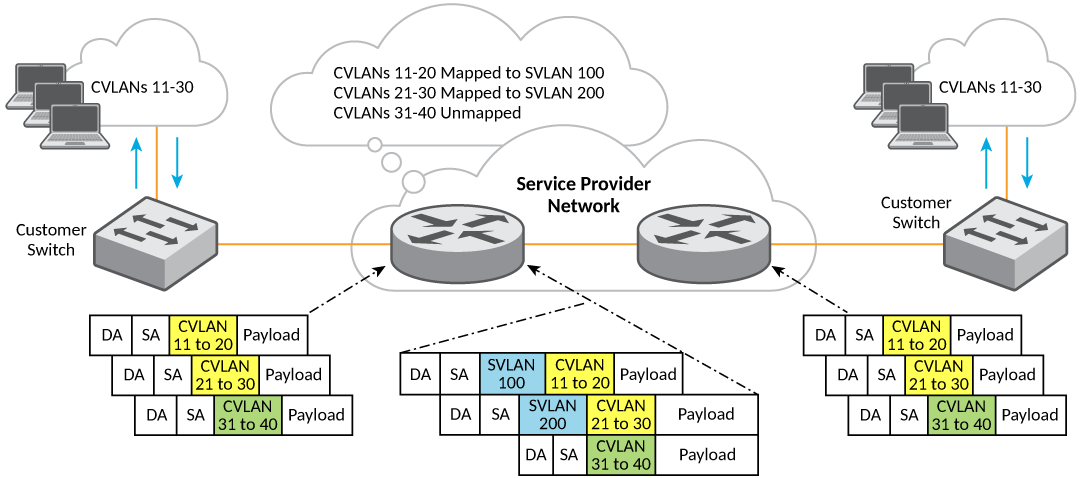
In the sample deployment shown in the preceding figure, CVLANs 11 to 20 are mapped to SVLAN 100, and are encapsulated with a service tag of 100. CVLANs 21 to 30 are mapped to SVLAN 200, and are encapsulated with a service tag of 200. Traffic from unmapped CVLANs 31 to 40 is forwarded normally. If the ingress port is not a member of the unmapped CVLANs, the traffic gets dropped as part of regular VLAN filtering.
Selective Q-in-Q VLAN Mapping
CVLANs are mapped with service VLANs
using the qinq-tunnel
cvlan command in interface subtype configuration mode.
Untagged and priority tagged packets are mapped to a service VLAN (SVLAN).
Considerations
The following must be considered while trying to configure selective Q-in -Q:
- If all the customer traffic needs to be tunneled using SVLAN, it is recommended to use tag-profile based Q-in-Q.
- Q-in-Q tunnel start points and tunnel end points should have symmetric CVLANs to SVLAN mapping.
- SVLAN ID cannot be a reserved VLAN ID.
- With the implicit dual-mode support, all ports are members of untagged VLAN 1 by default. Before configuring untagged selective Q-in-Q tunnel on a port, you must remove its untagged VLAN 1 membership.
- Tunneling of untagged Bridge
Protocol Data Units (BPDUs) like Link Layer Discovery Protocol (LLDP) or
Link Aggregation Control Protocol (LACP) works only if the selective Q-in-Q
tunnel has
untagtunneling configured. - Untagged tunneling can only be configured on one SVLAN per interface,when interface has multiple SVLAN configured.
- When an interface has multiple SVLANs configured, untagged tunneling can only be configured on one SVLAN.
- At the tunnel end-point, the TPID of SVLAN tags in the Q-in-Q packets must match the port’s configured TPID for selective Q-in-Q to function correctly where the service VLAN is removed while the traffic egresses out of service provider domain. Hence the SVLAN tag TPID value should be same on tunnel start and end points.
- For selective Q-in-Q, the maximum
transmission unit (MTU) value on ICX switches is increased by 4 bytes (1522)
from the default 1518 bytes to accommodate the additional dot1q tag. You can
use the
aggregated-vlancommand to increase the MTU of all the ports to 1522. - The following table displays the maximum number of
selective VLAN tunnels that can be configured per stack unit in a
system.
Maximum Selective VLAN Tunnels per Stacking Device
ICX platform Maximum number of C-VLAN tunneling per stack unit ICX 7850 8000 ICX 7750 8000 ICX 7650 8000 ICX 7450 8000 ICX 7250 8000 ICX 7150 1024 For example, in a two-unit stack of ICX 7550 devices, you can configure up to 16000 CVLAN mappings on the whole stack. This means, 8000 CVLANs on stack unit 1 and 8000 CVLANs on stack unit 2.
The number of VLAN mappings on a LAG is equal to number of member ports multiplied by the number of CVLAN mappings configured on the LAG interface. For example, if a LAG has 6 ports and on the LAG interface 10 CVLANs are mapped to an SVLAN, the total number of mappings is considered as 60.
Configuring Selective Q-in-Q
Perform the following steps to configure selective Q-in Q.
- Enter global configuration mode.
device# configure terminal
- If a port is not a member of the
above specified SVLAN ID, use the below command to add the port as a tag
member of the SVLAN.
device(config)# vlan 2
device(config-vlan-2)# tagged ethernet 1/1/22
- Navigate to the interface on which
Q-in-Q tunneling needs to be enabled.
device(config)# interface ethernet 1/1/22
device(config-if-e25000-1/1/22)# qinq-tunnel cvlan 22 svlan 200
To configure Q-in-Q tunneling for a LAG interface:
device(config)# interface lag 4
device(config-lag-if)# qinq-tunnel cvlan 25 svlan 200
To allow Q-in-Q tunneling of untagged customer traffic:
device(config)# interface ethernet 1/1/22
device(config-if-e25000-1/1/22)# qinq-tunnel cvlan untag svlan 1000
- (Optional) If there is a need to
change the TPID of SVLAN tag to other than 8100, complete the following
configuration on the egress port which is supposed to egress out with that
TPID.
device(config)# tag-profile 9100
device(config)# interface ethernet 1/1/22
device(config-if-e25000-1/1/22)# tag-profile enable
Displaying Q-in-Q Configuration
The following example shows a complete Q-in-Q configuration on both of the service provider edge devices.
device> show qinq-tunnel
		Total number of vlan(s) tunneled: 2865
		Total number of HW resource used: 2865
		Selective qinq enabled port(s): 1/1/1 1/2/2 lg1
  Port : 1/1/1 Number of CVLANs tunneled : 206
		Service vlan: 3000 Tunneled VLAN(s) : 2 to 3 5 6 7 100 to 200
		Service vlan: 3001 Tunneled VLAN(s): 400 to 500
  Port : 1/2/2 Number of CVLANs tunneled : 2600
		Service vlan: 333 Tunneled VLAN(s): 1 to 2600
  Port : lg1 Number of CVLANs tunneled: 53
		Service vlan: 3000 Tunneled VLAN (s): 500 to 550 600 , untag

device> show qinq-tunnel brief
  Total number of vlan(s) tunneled: 2865
  Total number of HW resource used: 2865
  Selective qinq enabled port(s): 1/1/1 1/2/2 lg1

device> show qinq-tunnel ethernet 1/1/1
  Port : 1/1/1 Number of CVLANs tunneled : 206
  Service vlan: 3000 Tunneled VLAN(s) : 2 to 3 5 6 7 100
When selective Q-in-Q is enabled, the show interface ethernet
command entered in conjunction with a pipe command to filter the output
displays the enabled status as follows.
device> show interface ethernet 1/1/16 | include Selective
  L2 Tunnel protocols enabled(mode:Selective qinq):CDP LACP LLDP STP
  Selective qinq enabled