Protected Port Overview
Protected Port prevents host-to-host communication within the same switch or stack, restricting all traffic except CPU-bound or CPU-originated traffic. This feature is widely applicable to access point (AP) aggregator switches used in hospitality, public Wi-Fi, campuses, and multi-dwelling units (MDUs).
Protected ports is a port-level, per-device/stack security feature that restricts communication with devices connected to the port. Once a port is protected, even if it is in an identical broadcast domain, it will not communicate with other protected ports, regardless of their VLAN membership. Instead, it will only access the uplink, ensuring isolation among hosts connected to the ports.
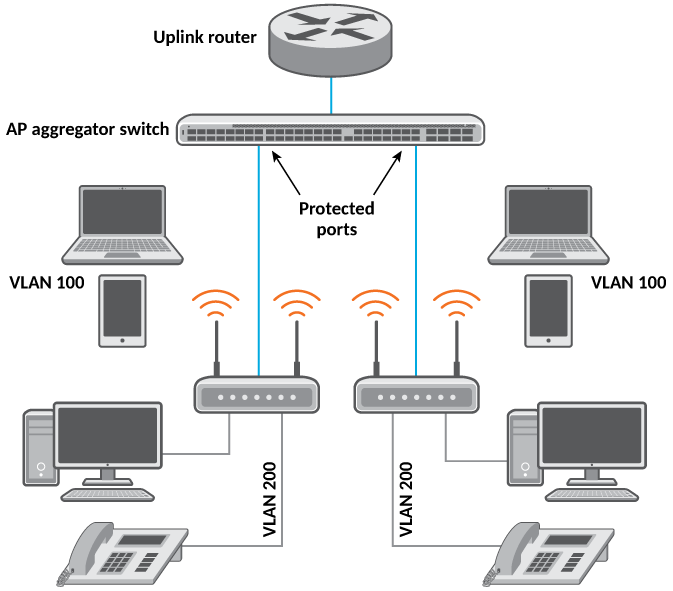
The following configurations are supported with the protected port feature:
The following should not be configured as protected ports:
- Uplink ports
- DHCP server ports
- ARP inspection trusted ports
- DHCP snooping trusted ports
- Ports on an active xSTP path in a device
- IGMP/MLD snooping router ports
- IGMP/MLD source ports
RUCKUS recommends that multiple interface (MIF) mode is configured when enabling this feature.
The following features are not supported on protected ports:
- Layer 3 interfaces (Port or LAGs with IP addresses are not supported)
- Mirror or monitor ports
- Private VLAN (PVLAN)
- PVLAN extension to protected-port switches
- Virtual Ethernet (VE) and group VE interfaces
- Loopback interfaces
- Management interfaces
- OpenFlow ports
- SPX provider edge (PE) ports
- SPX ZTP–enabled ports
- Multi-Chassis Trunk (MCT) ICL and CCEP ports