The SmartZone Data Plane
Feature Overview
The Data Plane (DP) adds a dedicated data-path element (vSZ-D or SZ144-D) that centralizes forwarding, policy enforcement, and services (DHCP/NAT, tunneling, L3 roaming, optional IPsec), reducing edge complexity compared to a controller-only network. It receives traffic from access points (APs), applies configured policies, and forwards the traffic to the core network or Internet.
- vSZ-D (Virtual Data Plane): Runs on VMware ESXi or KVM hypervisors.
- SZ144-D (Hardware Appliance): Designed for high-throughput environments requiring predictable performance.
The Data Plane establishes secure tunnels between access points and the DP using RUCKUS GRE, with optional IPsec encryption, and supports SoftGRE for integration with third-party gateways. It also delivers essential network services directly at the DP, such as DHCP and NAT, reducing complexity at the edge. For mobility, the DP enables Layer-3 roaming and uses Flexi-VPN to maintain seamless connectivity across multiple sites. Additionally, it supports Access–Core interface separation, which isolates AP-facing traffic from upstream traffic and ensures predictable bandwidth for each direction.
The following sequence shows how the Data Plane manages client traffic from the moment an AP connects until the data reaches its destination.
- The AP establishes the tunnel (typically RUCKUS GRE, optionally IPsec) and begins sending client traffic through the configured data VLAN toward the DP.
- The DP terminates the tunnel, decapsulates the frames, and applies configured profiles such as DHCP/NAT, QoS, and split-tunnel rules.
- The DP forwards traffic upstream through its Core interface (routed or VLAN trunk) or, in carrier scenarios, to a core Wireless Access Gateway (WAG) using L2oGRE encapsulation. At this stage, the DP also updates tunnel counters and statistics for monitoring.
- If Flexi-VPN is enabled, the DP establishes secure inter-DP tunnels to maintain client sessions during Layer-3 roaming between sites.
The following terms are specific to this feature and will help you understand the concepts and configuration options used throughout this guide.
- Access–Core Separation: DP uses distinct Access and Core interfaces to isolate AP-facing downstream traffic from core-facing upstream traffic, providing dedicated bandwidth for each direction.
- RUCKUS GRE: Layer 2 tunnel AP-to-DP optimized for SmartZone; supports DP-resident services.
- SoftGRE: Layer 2 GRE from APs to external gateways (non-RUCKUS).
- L2oGRE: Layer 2 extension from DP to a core Wireless Access Gateway (WAG) over GRE.
- Flexi-VPN: Inter-DP connectivity enabling Layer 3 roaming across sites.
Centralized and Distributed Topologies
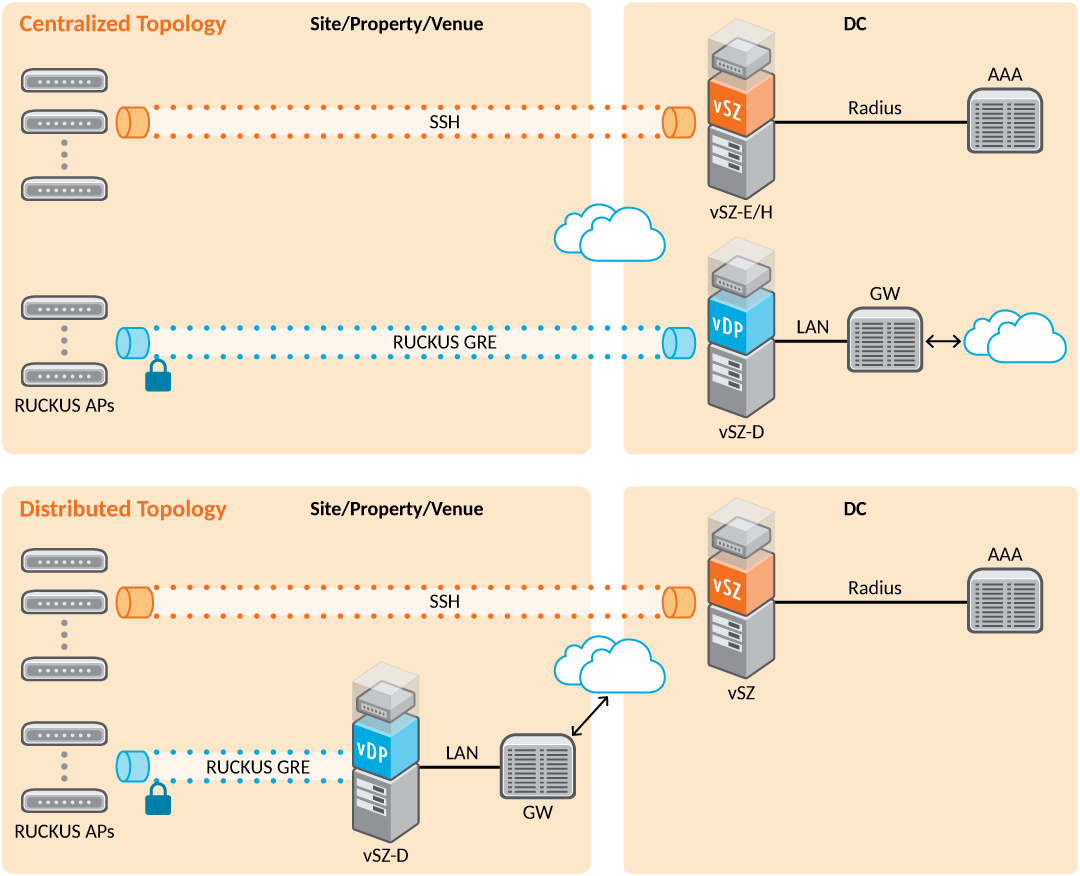
A SmartZone Data Plane (DP) can be deployed in two primary topologies: centralized and distributed. The choice depends on network design goals such as latency, bandwidth optimization, and control over DHCP and tunneling behavior. Both topologies use GRE or IPsec tunnels between APs and the DP, but the location of the DP determines the flow of DHCP traffic.
- Centralized Topology: In a centralized topology, the DP resides in the central office alongside the controller. All AP traffic, including DHCP requests from clients, is tunneled back to the central DP. When a client connects, its DHCP request travels through the tunnel to the DP in the central site, which allocates the IP address and returns the lease through the same tunnel. This design simplifies management and ensures consistent policy enforcement but introduces additional latency for remote sites because all traffic traverses the WAN.
- Distributed Topology: In a distributed topology, the DP is deployed at the remote site close to the APs. DHCP requests from clients are terminated locally at the remote DP, reducing latency and improving performance for branch or edge deployments. The tunnel still carries control traffic back to the controller, but data-plane functions such as DHCP and NAT occur locally. This approach minimizes WAN bandwidth usage and accelerates client onboarding.
Requirements
Before deploying or configuring the Data Plane, meet the following conditions to guarantee compatibility and proper operation.
Considerations
Keep these design and operational factors in mind when planning your deployment to avoid performance or connectivity issues.
- Placement: Co-locate DPs near traffic sources for low latency or centralized for inspection/aggregation; align with inter-site bandwidth and HA objectives.
- Interface mode: Use Access & Core separation if you need to isolate distinct routing domains; plan static routes to off-subnet services (for example, DHCP relay, L2oGRE endpoints).
- Tunneling selection: Configure RUCKUS GRE for AP-to-DP; configure SoftGRE for third-party gateways; add IPsec over untrusted transport; reserve L2oGRE/GTP for core integrations.
- Security/performance: IPsec adds CPU overhead; size DP accordingly.
Best Practices
Follow these recommended practices to optimize performance, maintain consistency, and simplify ongoing management.
- Standardize on Access–Core separation for multi-site or segmented designs.
- Keep DHCP/NAT at the DP when you want simple edge addressing and local breakout.
- Establish a consistent tunnel taxonomy and monitoring routine (AP tunnel stats; core stats).
- Normalize object names and profiles cluster-wide for reuse and automation.
Prerequisites
Complete these steps and confirm these elements are in place before you begin the configuration or upgrade process.