Enabling Flexi-VPN
Flexi-VPN enables forwarding of tunneled
traffic to another remote DP instance via inter-DP RUCKUS GRE Tunnels. Note that
advanced
VLAN features (VLAN Pooling, Dynamic VLAN, Core network VLAN, and DP tunnel NAT)
should be
disabled.
Note: Flexi-VPN is activated when a Flexi-VPN profile is assigned
to a WLAN.
- In the controller web UI, select
.The Wireless LANs page opens.
- In the Wireless
LANs page, select the WLAN for which you want to enable Flexi-VPN
and click
 .The Edit WLAN Config: page opens.
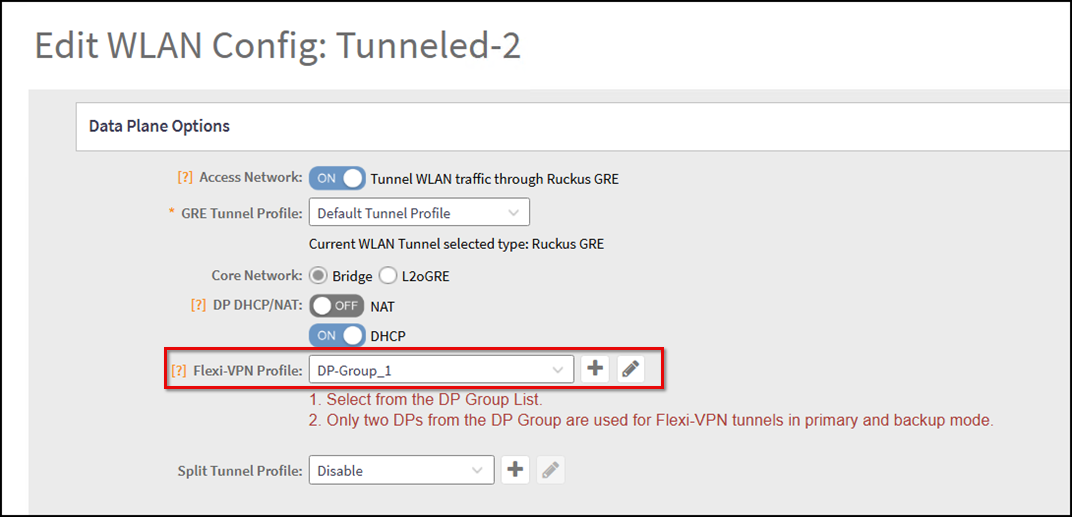
- In the Edit WLAN Config: page, scroll to the Data Plane Options.
- In the Flexi-VPN Profile field,
select a DP Group from the drop-down menu or click
 to
create a new DP Group.
- Click OK to save the WLAN configuration.The WLAN configuration is saved and Flexi-VPN is activated in the WLAN.
Note: A Flexi-VPN profile consists of a secondary DP Group to
which the client traffic will be forwarded when connecting to the network from
an AP
in a different Zone. If you change the DP Group assigned to that Zone, the Flexi-VPN
profile is not automatically updated, which may result in a redundant or conflicting
profile.