Configuring TACACS+ Settings
- On the menu, select Admin >
Users. The Users window is displayed.
- In the Users window, select the TACACS+ tab.
- Click the
 icon to add a TACACS+ server configuration.
- Complete the following fields to
configure TACACS+ server credentials.
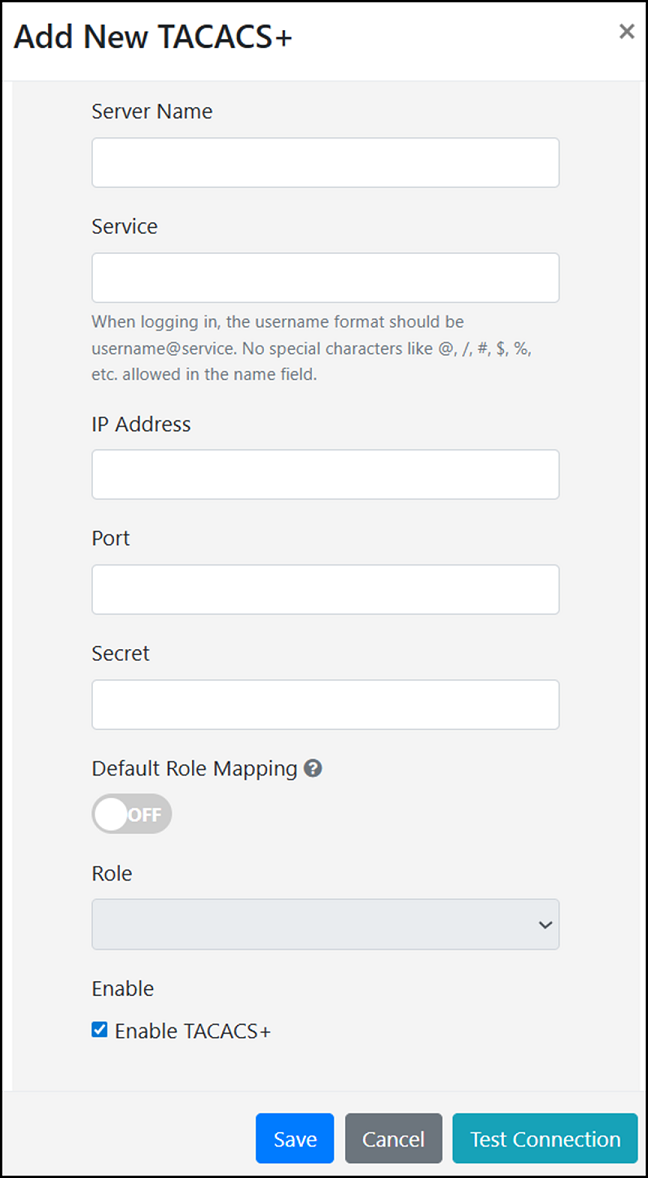
- Server Name: Enter a recognizable name for the TACACS+ server.
- Service: Enter a name of the service to be used for TACACS+
authentication, without any special characters.
The service name entered in this field is used when logging in to RND. To log in, enter the username in the format <user>@<service>.
- IP Address: Specify the IP address of the TACACS+ server.
- Port: Enter the port number. The default port number is 49.
- Secret: Enter the shared secret for the TACACS+ server to enable secure communication.
- Default Role Mapping: This option defines how user-role mapping
is managed for TACACS+ users, offering a streamlined approach to role
assignment. By default, the Default Role Mapping
option is disabled. The behavior of this feature is as follows:
- When the Default Role
Mapping option is disabled:
- The TACACS+ administrator must be
manually mapped in the RND local database by adding
their account in the Users tab. The
username attribute entered in RND must match the
user-nameattribute defined in the TACACS+ server configuration. For more information, refer to Adding a User Account. - The user's role is determined by the configuration in the Users tab (the RND local database).
- This mode enables RND to differentiate user groups within the TACACS+ server based on their locally defined attributes.
- The TACACS+ administrator must be
manually mapped in the RND local database by adding
their account in the Users tab. The
username attribute entered in RND must match the
- When the Default Role
Mapping option is enabled:
- The system automatically maps user
accounts within the TACACS+ server (including the
user account,service,member/group, anduser-nameattributes) to a default local admin permission in RND, even if the TACACS+ server does not use mapping attributes. - Users do not need to be added to the RND local database for authentication.
- The role for the user is determined by the role configured in the TACACS+ settings (defined in the Add New TACACS+ window). If the same user exists in the local database with a different role, the role defined in the TACACS+ settings takes precedence.
- The system automatically maps user
accounts within the TACACS+ server (including the
- When the Default Role
Mapping option is disabled:
- Role: Select one
of the following roles for the user from the drop-down list. The
Role option is available for selection only
when the Default Role Mapping option is enabled.
Role-based access control governs user permissions by assigning specific roles to user accounts, each with distinct privileges that determine the functional access level. The user-to-role mapping ensures that role policies are correctly applied upon authentication.
- SUPERADMIN: Provides complete access to all modules and actions.
- ADMIN: Provides restricted privileges and does not allow performing RUCKUS Network Director system-level tasks such as DB backup, upgrade, user creations, and so on. The user works at the level of an operator with the privileges to configure clusters and APs.
- VIEW: Provides limited access restricted to monitoring the system and viewing information, without permissions to modify, create, or delete configurations and data.
For more information on user accounts and role mapping, refer to User Account.
- Enable TACACS+: Enables user authentication through the configured TACACS+ server. This option is enabled by default. When disabled, the TACACS+ server settings remain saved in the system but are not used for authentication.
- Click Test Connection to verify the connection and
confirm that TACACS+ is correctly configured.The Test TACACS+ Connection window is displayed.
- Click Save to save TACACS+ server settings in RUCKUS Network Director.