Generating Reports for Rogue Devices
- After you to login to the Web interface, select Reports from the menu in the left.
- Click
Rogue in the sub-menu.
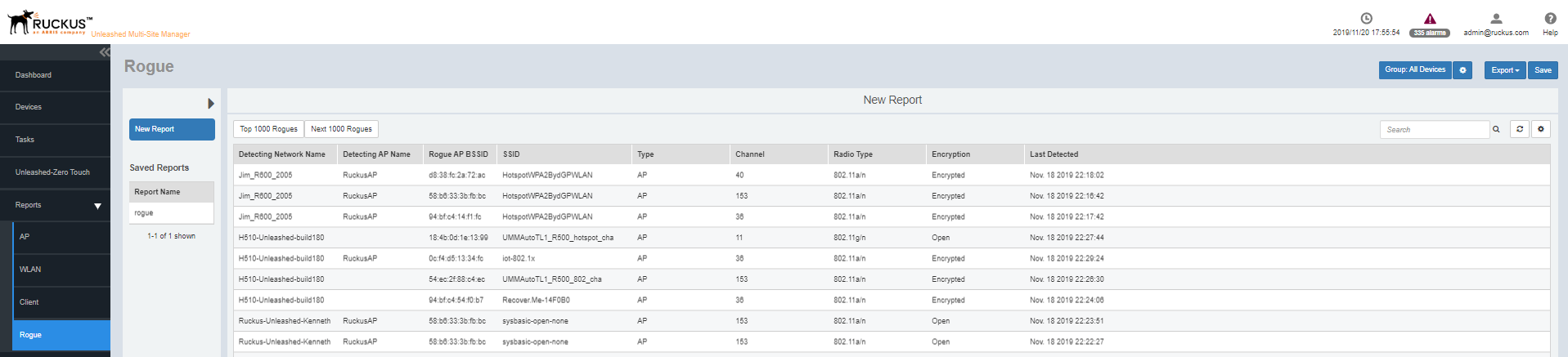
The Rogue reports page is displayed with a Report Option area, Table area and a Graph area.
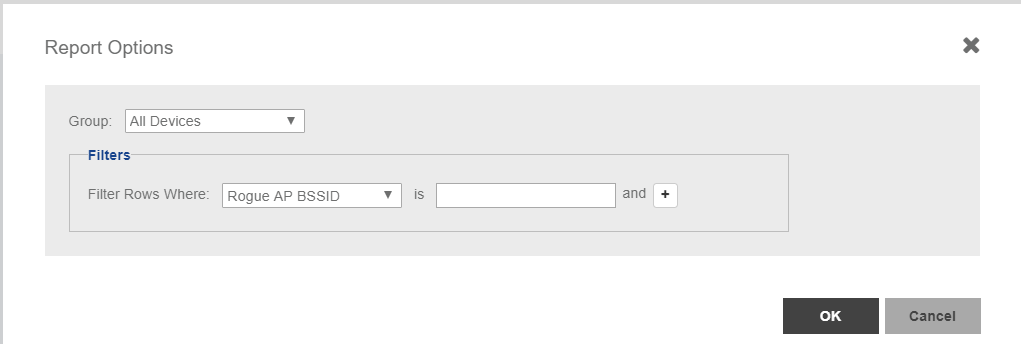
The Reports Option area displays the Group and Filters. Refer the illustration below.
The Table area displays additional information about the rogue devices such as their BSSID, SSID, type, channel, radio, encryption and so on.
You can also click on Export and select CSV or PDF to have the reports saved as a CSV or PDF file respectively.
The options Top 1000 Rogues and Next 1000 Rogues displays the list of top 1000 and next 1000 rouges devices detected thus far respectively.
UMM 2.2The page typically displays following information about the rouge device that's detected:
- Detecting Network Name
- Detecting AP Name
- Rouge AP BSSID
- SSID
- Type
- Channel
- Radio Type
- Encryption
- Last Detected
- Configure the report settings as described in
Configuring Report Options.
The table area displays information about the rogue devices such as the BSSID, type, channel, radio, encryption and so on.