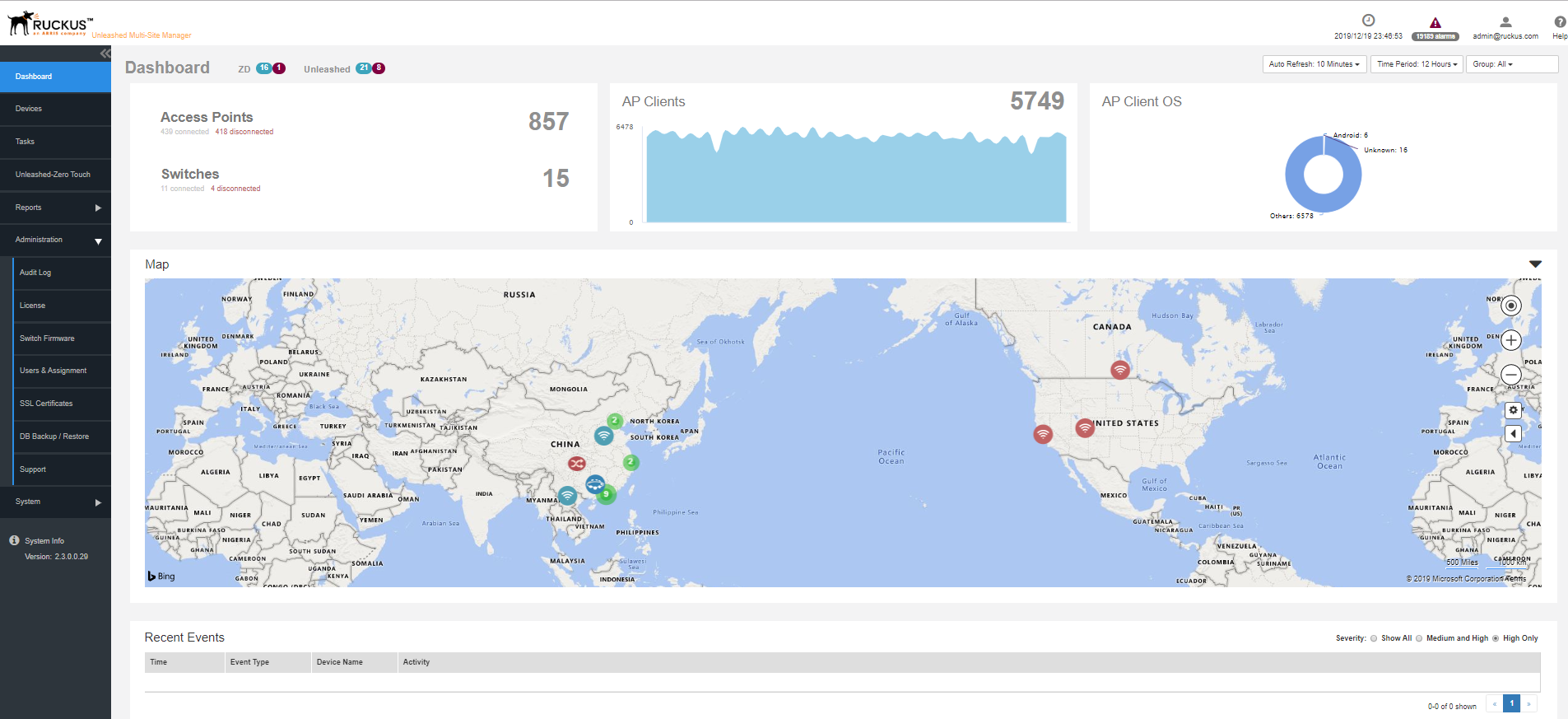
Seven tabs group related tasks that you can perform in
Unleashed Multi-Site Manager . These tabs include:
Dashboard
Devices
Tasks
Unleashed-Zero Touch
Reports
Administration
System
2
Submenu
On each tab are second level menu items that, when clicked, display related options
in the content area to the right.
3
Alarms, Help and Log Out
Alarm severity is classified into the order of
Critical,
Major,
Minor and
Warning. It shows the number of alarms triggered based on the severity. For example, if
Critical alarms are generated, it will show the number of critical alarms. If there aren't
any critical alarms, then it will show the number of alarms in the next severity type
- the number of
Major alarms.
Shows the major alarms (if enabled in
Monitor > Alarm Settings).
Shows the current software date and time.
Click the
Help link to open the online help.
Click the
Log Out link to log out of the software. The user name identifies the user who is logged
in.
If
Unleashed Multi-Site Manager has an active
trial license file, then a notice appears that the software is using the trial license
file and when the trial license file expires.
Unleashed Multi-Site Manager will not delete the device when license expires. It just changes the status of the
device which does not have enough licenses to
license exceed and stops to monitor and manage them.
4
APs and Switch panel
Displays the number of APs and switches that are connected and disconnected for a
period of time.
5
Clients panel
Displays the number of clients that are connected for a period of time.
6
Clients OS/Radio/Vendor panel
Displays the OS/Radio/Vendor utilization by the clients.
You can modify
the dashboard view by selecting the following options present
above this panel:
Auto Refresh
Time Period
Group All
7
Map
Displays information about the APs deployed in the Goggle map.
8
Recent Events/Alarm
Displays the events/Alarm that were recently triggered for the
device (ZoneDirector, Unleashed APs or ICX switches). You can also
sort the events to view them by severity type.