Viewing Events
An event is an occurrence or the detection
of certain conditions in the RUCKUS IoT Controller or
associated network devices within its ecosystem. An AP rebooting, detection of a
RUCKUS I100 IoT Module, and module swap, are all examples of events.
To view the events, perform the following steps.
- From the main menu, select .
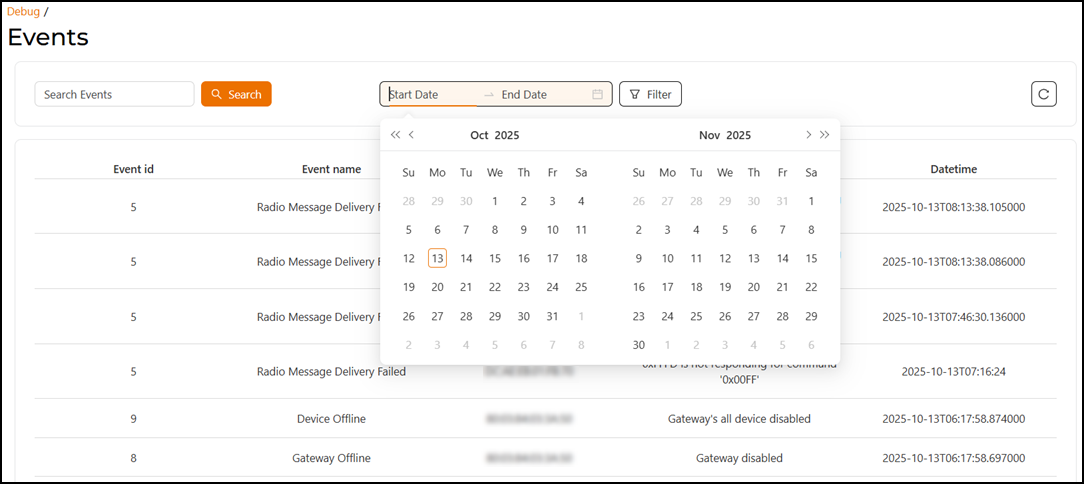
- Enter a keyword in the Search Events field and click the Search button to locate specific events.
- Click the Start Date and
End
Date fields to open the calendar. Select a date range and click
the Filter button to display events that occurred within
that period.
Events within the specified range will appear in the table, which include Event id, Event name, Gateway euid, Event message, and Datetime.
The following table lists examples of some event IDs and their descriptions. This is not intended to be a comprehensive listing.
- Click the
 icon to reload the page.
 - Use the pagination controls at the bottom of the page to navigate through the
list of items.
- The item count displays the total number of items and the range currently shown (for example, 1–20 of 217 items).
- The page numbers let you navigate directly to a specific page. The current page appears highlighted.
- The arrow icons let you move to the previous or next page.
- The entries-per-page drop-down allows you to select how many items to display per page (for example, 10, 20, 50, or 100 entries).
- The Go to Page field allows you to enter a page number and jump directly to it.