Promoting the Secondary Node to Primary

This feature allows you to promote the current secondary node to be the primary node. Perform this task when the primary node is unrecoverable.

You will need the static IP address and the license file name (.bin) of the new secondary node.

Follow these steps to promote the current secondary node to the primary node and configure a new secondary node.
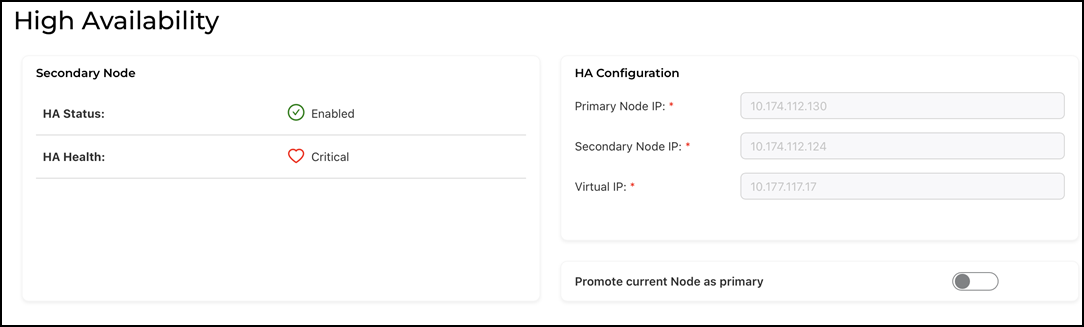
  1. From the main menu, select Admin > HA.
  2. In the SECONDARY NODE section, click the Promote current Node as primary toggle button.

    Promoting the Current Secondary Node to Primary Node

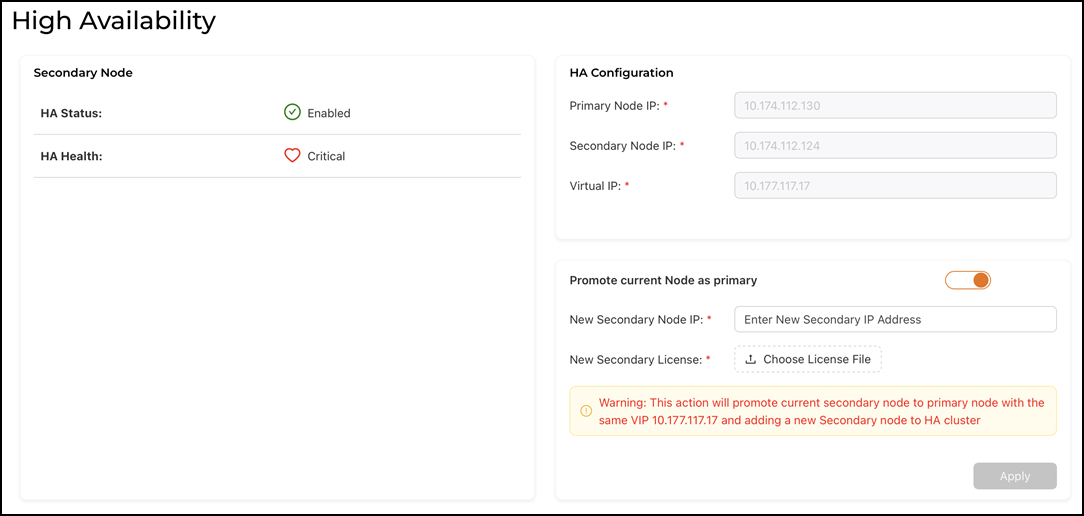
    Configuring Parameters for New Secondary Node

  3. Configure the parameters for the new secondary node.
    1. New Secondary Node IP: Enter the static IP address of the new secondary node.
    2. New Secondary License: Click Choose License file. This action opens a file picker so you can upload the secondary node’s license file.
  4. Click Apply.

    A dialog box displays the message Secondary node promoted to primary node confirming the promotion. The secondary node is promoted to the primary role, taking over all the responsibilities.