Stacking
A RUCKUS stack contains from two to 12 units configured in a ring or linear topology. The units in a stack are from the same model family; for example, a stack can be an ICX 7550 stack or an ICX 7850 stack, but it cannot combine ICX 7550 and ICX 7850 devices.
The members of a stack may be located together. For example, top-of-rack switches can form a stack that acts as a single switch to manage data center access. Stack members can be physically separated, and the distance between stacking members depends on the type of connector cables used.
Certain fiber optic options increase the potential distance between stacks, which allows members of the same stack to reside in different wiring closets, on different floors of one building, or in different buildings across the campus as illustrated in the following figure. Refer to FastIron stacking distances and optics by device for more information.
RUCKUS stackable devices are connected either through dedicated stacking ports or through ports that can be configured for either stacking or data. The location of stacking ports and configuration options differ by device type. Refer to the section on each device type for more information.
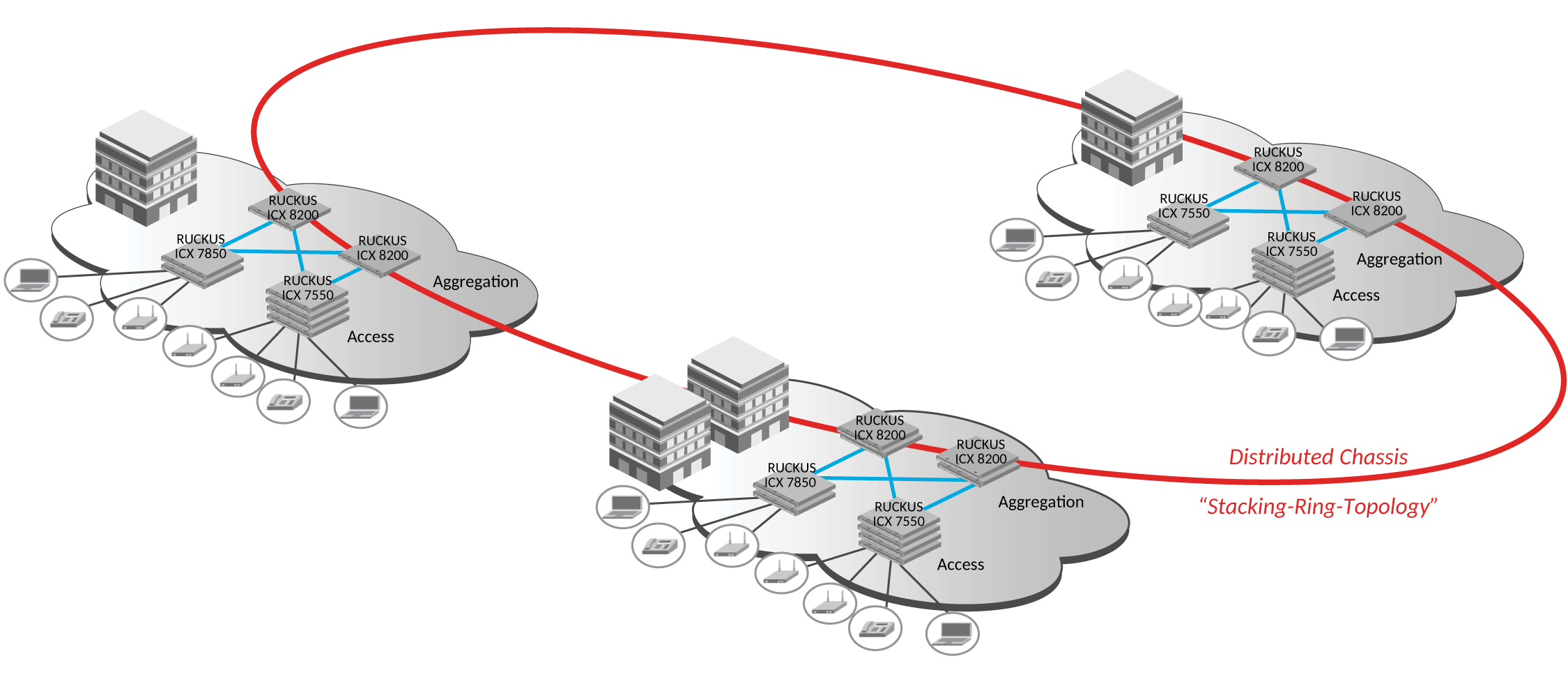
Network Management and Stack Configuration
Even when all the switches within a stack are physically distributed, you can manage them as a single entity, enabling one-touch configuration changes via a single IP address.
The active controller manages the other stack units. It maintains the information database for all stack members and downloads software images as needed to all stack units. Each stack also has a standby controller for stack redundancy, and the stack can fail over seamlessly to the standby.
Configuring the stack through the stack interactive-setup utility is straightforward. Stack zero-touch provisioning can be enabled to automate stack interactive-setup so that no user intervention is required. Custom configuration can be combined with automated setup if, for example, you want to add units, move stacking ports, create trunks, or transform a default stacking port into a data uplink port.
Switching and Routing Advantages
Packet switching between ports on stack units is handled by the hardware. All protocols operate with stacking in the same way as on a chassis system.
You can use stack connections to link distributed switches instead of standard inter-switch links with Layer 2 Spanning Tree Protocol (STP) or Layer 3 routing. Using stack connections has significant advantages:
- Layer 2 simplicity. Stack links do not need to be considered as part of the overall network topology, which means that they can be used to provide resiliency, and Layer 3 routing is not needed to manage traffic flows.
- No closed links. Because the stack links are internal to the switches, they are not seen as part of a Layer 2 network. This means that all links can remain open and can be used to carry traffic simultaneously, maximizing throughput.
- Fast failover. The rapid detection and recovery techniques used on stack links mean that the failure of a link or a switch results in hitless failover, with no impact on user services.