Building a Two-unit Linear-topology Trunk Manually
The following procedure uses an ICX 8200 stack as an example. The two-unit ICX 8200 stack has one potential linear-topology trunk, (x/2/1 to x/2/4). The following figure shows the appropriate cabling for the four-port linear topology trunk (x/2/1 to x/2/4) on an ICX 8200-24P two-unit stack configured in the following procedure.
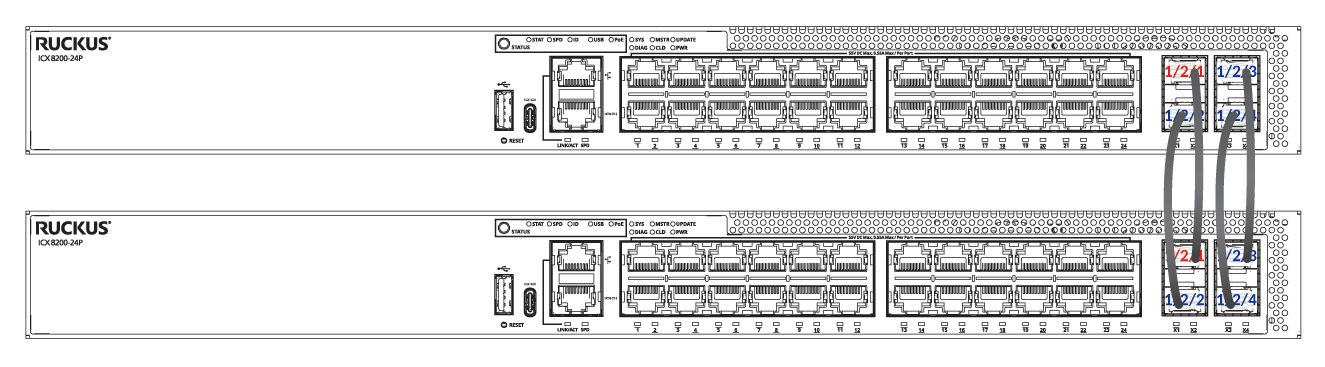=GUID-5ED572FB-53F2-4F59-AFF7-17E0DFB47A95=1=en-US=Low.png)
Complete the following steps to configure a two-unit linear-topology trunk manually (in this case, on an ICX 8200 two-unit stack).
- On both units, create the desired trunk in stack unit configuration sub-mode.
ICX8200-24P Router# configure terminal
ICX8200-24P Router(config)# stack unit 1
ICX8200-24P Router(config-unit-1)# stack-trunk ethernet 1/2/1 to 1/2/4
stack-trunk ethernet 1/2/1 to 1/2/4 replaces stack-port ethernet 1/2/1 and stack-port ethernet 1/2/3
The example configures ports 1/2/1 through 1/2/4 as a stacking trunk on one of the stack unit candidates. Enter the trunk configuration on the other unit, too. - Enter the
stack enablecommand on both units. - Connect cables between the two units. (For this example, connect four cables.)
- Enter the
write memorycommand to save the learned configuration.
The following example shows the manual formation of a two-unit ICX 8200 linear-topology stack.
ICX8200-24P Router# configure terminal
ICX8200-24P Router(config)# stack unit 1
ICX8200-24P Router(config-unit-1)# stack-trunk ethernet 1/2/1 to 1/2/4
stack-trunk ethernet 1/2/1 to 1/2/4 replaces stack-port ethernet 1/2/1 and stack-port ethernet 1/2/3
ICX8200-24P Router(config-unit-1)# stack enable
Enable stacking. This unit actively participates in stacking
ICX8200-24P Router(config-unit-1)# end
ICX8200-24P Router# show stack
T=14m51.8: alone: standalone, D: dynamic cfg, S: static
ID   Type          Role    Mac Address    Pri State   Comment
1  S ICX8200-24P   active  c0c5.207e.daea   0 local   Ready

    active
     +---+
  2/1| 1 |
     +---+
Role history: N: standalone, A: active, S: standby, M: member
U1: N->A

Current stack management MAC is c0c5.207e.daea
ICX8200-24P Router# show running-config
Current configuration:
!
ver 10.0.00_b324T253
!
stack unit 1
  module 1 icx8200-24p-port-management-module
  module 2 icx8200-4-sfp-plus-port-100g-module
  stack-trunk ethernet 1/2/1 to 1/2/4
stack enable
stack mac c0c5.207e.daea
!
hitless-failover enable
!
... snipped

end

=============================== unit 2 log ==========================
ICX8200-24P Router> enable
No password has been assigned yet...
ICX8200-24P Router# configure terminal
ICX8200-24P Router(config)# stack unit 1
ICX8200-24P Router(config-unit-1)# stack-trunk ethernet 1/2/1 to 1/2/4
stack-trunk ethernet 1/2/1 to 1/2/4 replaces stack-port ethernet 1/2/1 and stack-port ethernet 1/2/3
ICX8200-24P Router(config-unit-1)# stack enable
Enable stacking. This unit actively participates in stacking
ICX8200-24P Router(config-unit-1)# show stack
T=13m14.5: alone: standalone, D: dynamic cfg, S: static
ID   Type          Role    Mac Address    Pri State   Comment
1  S ICX8200-24P   alone   c0c5.207c.26ec   0 local   None:0


     +---+
  2/1| 1 |
     +---+
Current stack management MAC is c0c5.207c.26ec
ICX8200-24P Router(config-unit-1)# show running-config
Current configuration:
!
ver 10.0.00_b324T253
!
stack unit 1
  module 1 icx8200-24p-port-management-module
  module 2 icx8200-4-sfp-plus-port-100g-module
  stack-trunk ethernet 1/2/1 to 1/2/4
stack enable
stack mac c0c5.207c.26ec
!
hitless-failover enable
!
... snipped

end

=====================unit 1 log after unit 2 has reloaded and joined ===============
ICX8200-24P Router> enable
No password has been assigned yet...
ICX8200-24P Router# show running-config
Current configuration:
!
ver 10.0.00_b324T253
!
stack unit 1
  module 1 icx8200-24p-port-management-module
  module 2 icx8200-4-sfp-plus-port-100g-module
  stack-trunk ethernet 1/2/1 to 1/2/4
stack unit 2
  module 1 icx8200-24p-port-management-module
  module 2 icx8200-4-sfp-plus-port-100g-module
  stack-trunk ethernet 2/2/1 to 2/2/4
stack enable
stack mac c0c5.207e.daea
!
hitless-failover enable
!
... snipped

end

ICX8200-24P Router# show stack
T=17m51.1: alone: standalone, D: dynamic cfg, S: static
ID   Type          Role    Mac Address    Pri State   Comment
1  S ICX8200-24P   active  c0c5.207e.daea   0 local   Ready
2  D ICX8200-24P   member  c0c5.207c.26ec   0 remote  Ready

    active
     +---+        +---+
     | 1 |2/1==2/1| 2 |
     +---+        +---+
There is no standby. Will assign a standby in 59 sec

Note: standby assignment delayed by large ACL config, delay #=0
Role history: N: standalone, A: active, S: standby, M: member
U1: N->A

Current stack management MAC is c0c5.207e.daea
ICX8200-24P Router# write memory